
Description
Africa Day Event Flyer PSD Template
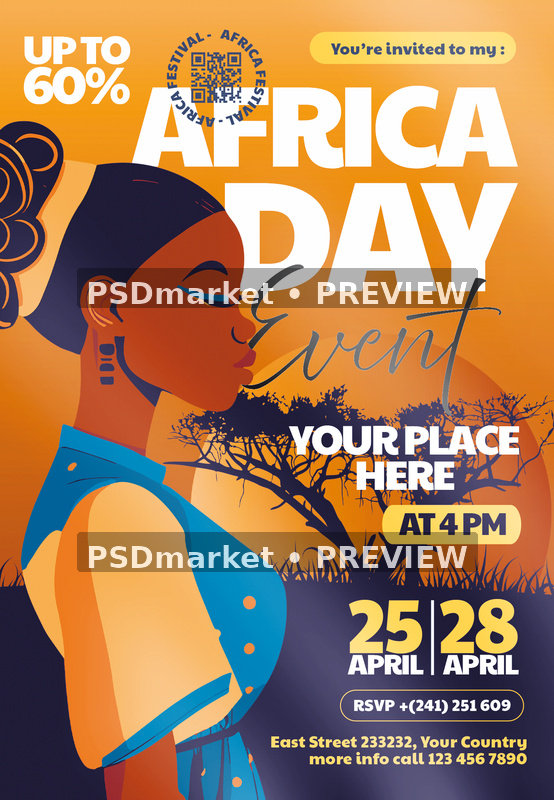
Create an eye-catching cultural event announcement with the Africa Day Event Flyer PSD Template. The portrait layout combines a stylized illustrated woman, a warm orange sky and dark tree silhouettes with large white AFRICA DAY lettering. Blue clothing, yellow date blocks and flowing Event script add contrasting accents throughout the design.
A large event title fills the upper section, while the venue, time, dates and RSVP details sit toward the lower right. The supplied design also includes a promotional percentage and a QR-style graphic near the top. This colorful composition offers a starting point for a community celebration, arts program, cultural gathering or Africa-themed festival promotion, with room to tailor the wording to the specific event.
What is included
- One original layered Adobe Photoshop PSD document.
- One readme text file with editing guidance and font references.
- Original ZIP archive: 20,162,717 bytes.
- PSD source file: 65,325,241 bytes.
- No separate JPEG, PNG, font files or social-media-size document is included.
Verified document specifications
- Native canvas: 1350 × 1950 pixels, portrait orientation.
- Stored resolution: 300 ppi horizontally and vertically.
- CMYK color mode, four channels and 8 bits per channel.
- Embedded profile: Coated FOGRA27 (ISO 12647-2:2004).
- Layered PSD with native text layers for the supplied event copy.
The readme states 1275 × 1875 pixels and a 4 × 6 inch format with 0.25-inch bleed, but that generic statement differs from the inspected PSD. Use the verified native canvas above and confirm trim size, bleed, safe margins and output profile with your print provider.
Customize your event flyer
Replace AFRICA DAY and Event as needed, then update YOUR PLACE HERE, AT 4 PM, the 25 APRIL and 28 APRIL sample dates, RSVP number and address. Treat those dates as placeholders rather than a statement about an official observance. Remove or change UP TO 60% unless a relevant offer actually applies. Replace the sample QR graphic with a code for your own authorized destination, and test it from the final exported image. Review the invitation line and all lower contact text before sharing.
Open the PSD in Adobe Photoshop and save a working copy. The file contains named text and design groups, color options and adjustment layers. The readme also includes generic image-replacement steps and a reference to a “Trance” layer; verify the actual layer structure before following those directions. Separate text layers do not mean every illustration or decorative element is independently editable.
Fonts and software
The readme references Paytone One and Above the Beyond. Font files are not included. Check availability and usage rights with the font providers and activate or obtain the appropriate fonts before editing. A “free fonts” heading in the readme does not establish a license for your intended use. Recheck line breaks and spacing after font activation. Adobe Photoshop is the intended application; other editors have not been tested.
Ideas for using this template
Use this layout to introduce a festival program, community gathering, cultural showcase or related celebration. Select event wording that reflects the actual organizers and participants, and make the venue and registration route easy to find. The warm palette and large illustration carry well into a digital announcement after you export and check a screen-ready version.
Download and print preparation
This is a digital template; no physical item is shipped. The listing preview is rendered from the original PSD with PSDmarket preview watermarks. The source ZIP remains unchanged. Stored 300 ppi resolution does not guarantee the effective resolution of every embedded element, so inspect the final artwork and proof its colors before production.
Please review File Requirements and License & Usage before ordering. Keep the untouched archive as a backup and export customized print and screen files separately.
Reviews
There are no reviews yet.