
Description
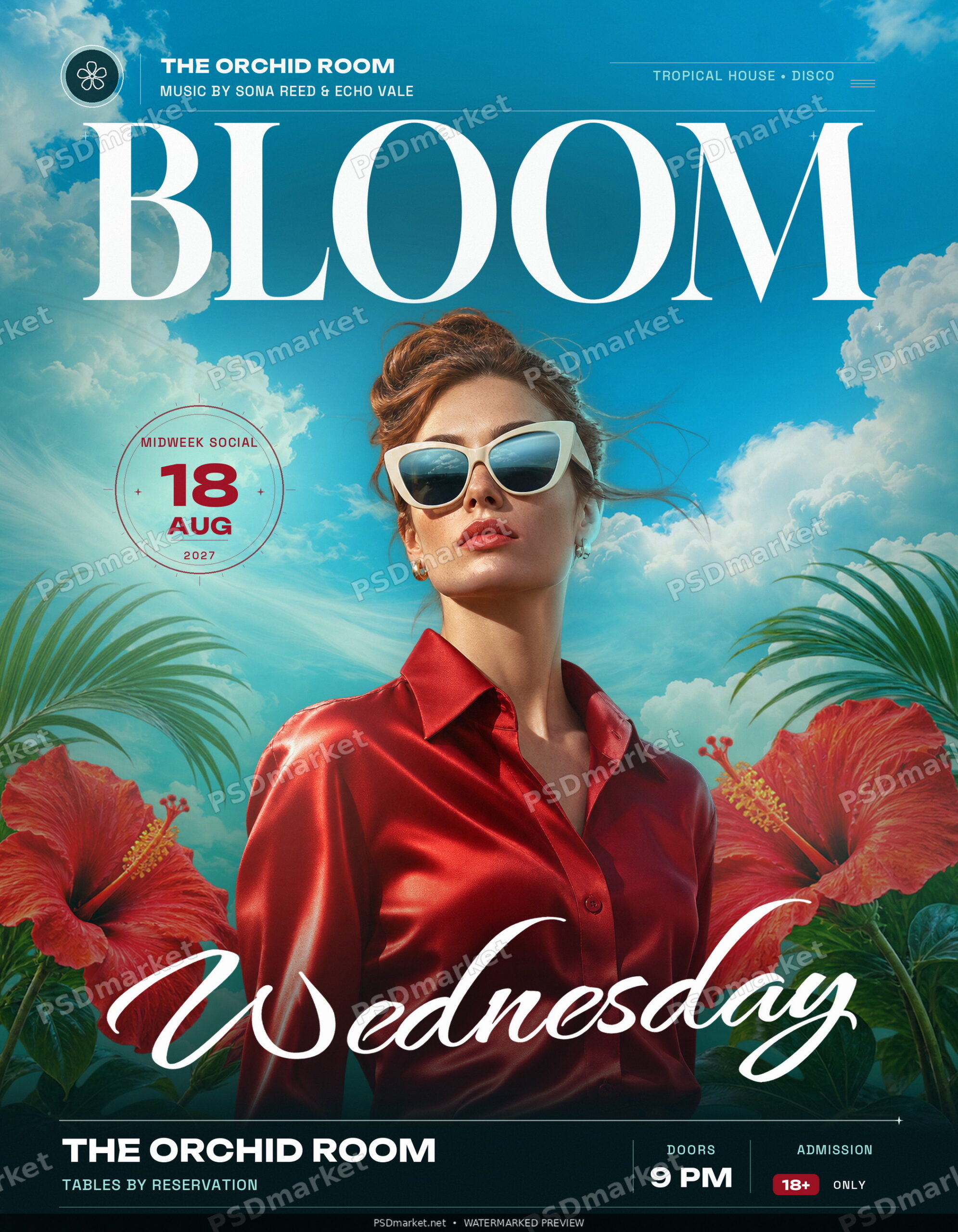
Bloom Wednesday is a tropical ladies night flyer PSD with the look of a fashion campaign for a night out. A centered fashion portrait in glossy vermilion satin catches cool cyan light from the turquoise sky. Cloud reflections in the ivory sunglasses echo the backdrop, while dark tropical leaves and scarlet hibiscus frame the figure. A white serif BLOOM spans the sky, and a brush-script Wednesday sweeps over the red satin. The round date badge and dark reservation strip give the practical details their own areas.
Use the layout for a rooftop party, a city club’s midweek series or a hotel lounge bringing in a guest DJ. The tropical color does the work of a theme, so it suits an indoor room as well as a terrace. If the night has a dress theme, add one short cue that tells guests whether it is optional. For a recurring event, let the series name stay familiar and give each edition a reason of its own to get onto the calendar, whether that is a different guest or a change in the music.
Show guests what makes this Wednesday different
Use the lineup to give the guest and resident DJ their own credit. The sample Tropical House • Disco line points to a particular sound in a few words. If the programming shifts from week to week, use that space for what guests will actually hear. A night that opens with an easy terrace set and moves indoors later can lead with the main draw, then put the full running order and room details on the event page.
Make the date and admission details easy to find
Keep the Wednesday name familiar and give the date enough space to distinguish one edition from the next. If doors and music start at different times, say which time appears on the flyer. Choose one clear instruction for your room: join the guest list, reserve a table or check admission at the door. Use the venue’s actual age and entry policies and make any time-limited conditions easy to find next to the booking information. The pictured venue, lineup and entry details are examples for the design, not a ticket or reservation.
Start with the full vertical design for your venue door, event calendar or social announcement. The clouds and leaves give the portrait much of its depth, so check any tight crop before using it. Repeat the venue, date and reservation details in the post text where someone can copy them. For printed copies, ask your printer about trim and bleed and proof the small type at the size guests will see it.
What comes with the flyer
The ZIP includes a layered RGB Photoshop PSD, 2625 × 3375 pixels at 300 ppi, a clean full-resolution JPEG, an editing guide and the four fonts used in the artwork with their license files. The main serif headline and Wednesday script are editable text, along with the performer billing, date badge, venue, doors time, admission and reservation line. The portrait, sky and hibiscus sit on separate layers, so changing the event information does not mean rebuilding the scene.
Install the supplied fonts before opening the PSD. If your club name or lineup is longer than the example, check the fit in the narrow header and bottom strip before exporting. The JPEG shows the supplied design; export a new image from the PSD once your details are in place.

Reviews
There are no reviews yet.