
Description
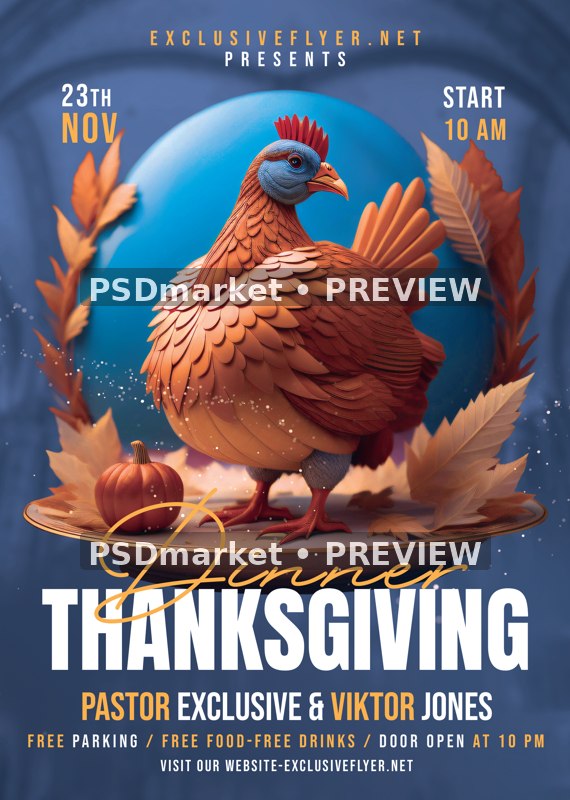
Blue Oval Turkey Thanksgiving Dinner Flyer
A stylized copper-orange turkey stands in front of a luminous turquoise oval, framed by autumn foliage and small pumpkins against a blue background. Gold Dinner script crosses the base of the illustration above a bold white Thanksgiving headline and footer details.
What is included
- One layered Photoshop PSD, 1819 × 2551 px
- 300 ppi, 8-bit CMYK
- 29 layers/groups including 8 live editable type layers and 1 embedded smart-object layers
- Canvas is 6.063 × 8.503 inches at its saved resolution; trim and bleed are not independently verified.
- The turkey, blue oval, foliage, pumpkins and base are one embedded PNG smart-object image; those central scene elements are not individually editable. Eight live type layers remain editable separately.
- ZIP contains one PSD, 1 source JPEG preview(s) and 1 documentation text file(s). No font files are bundled.
The preview is a reduced, watermarked image of the actual stored PSD composite. The source-branding cover layer is already hidden in the supplied PSD. The original ZIP is unchanged.
Adobe Photoshop editing workflow; obtain the active fonts or suitable licensed substitutes before editing.
The active fonts are Anton Regular, Bebas Neue Regular and Bellarina. The Bellarina distributor page states that promotional or commercial use requires a license; do not assume the demo/personal-use download is licensed for a commercial event. Font files are not bundled.
Correct the sample 23TH nov ordinal to 23rd or replace it. Reconcile START 10 AM with DOOR OPEN AT 10 PM. Replace pastor names, presenter and website fields, and free parking/food/drinks claims before use.
Sample prices, dates, promotions and names are design placeholders, not verified event information or the template purchase price.
Use measured PSD canvas facts rather than generic source documentation; exact trim/bleed boundaries and application-version compatibility are not independently tested.
Fonts and editing
Open the PSD files in Adobe Photoshop and customize the available text layers. Font files are not included; the readme provides font-reference links. Review missing-font prompts and verify each font’s license for your intended use. Proof all content before printing or publishing.
Download and usage
Your purchase provides the original ZIP through the store’s authorized order and account download links. Review File Requirements and License & Usage before ordering.
Reviews
There are no reviews yet.