
Description
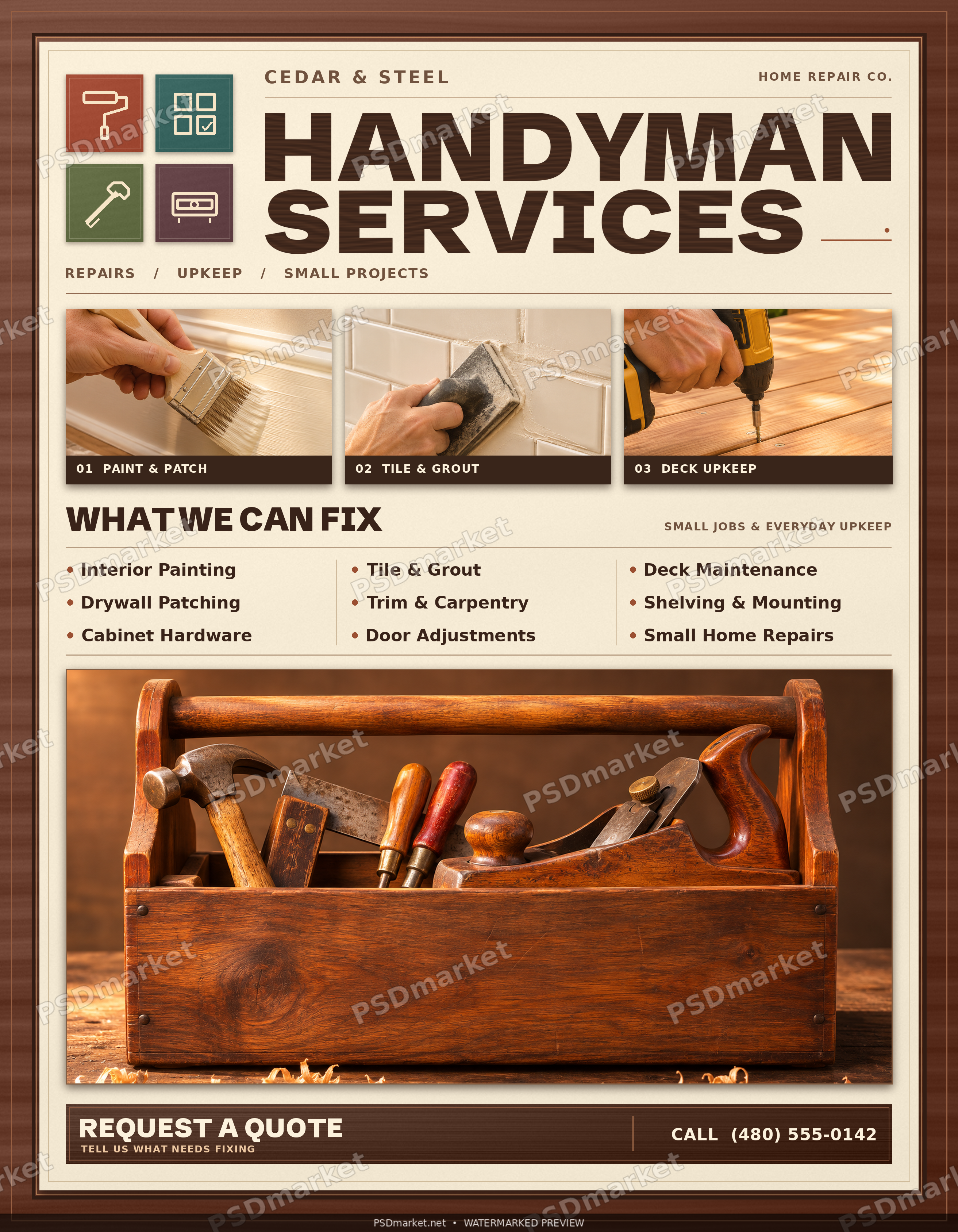
The Cedar & Steel handyman services flyer PSD is designed for local repair businesses that need to explain what they do without handing customers a wall of text. The oversized walnut-toned headline makes the trade clear at a glance. A row of three project photos shows the kind of work on offer, then a compact services directory gives people the details they need to decide whether to call. A traditional wooden toolbox and well-used hand tools close the design before the quote prompt.
The warm ivory paper, woodgrain border and small trade icons give the page a workshop character without making the service list hard to read. This is a good fit for a one-person handyman business, a small maintenance team or a property repair company that handles the jobs between basic upkeep and larger renovations. Use it as a neighborhood handout, in a welcome packet for landlords, or as a graphic for a local community page.
Make the handyman services flyer PSD work for your business
Start with the three jobs you most want people to book. The sample images and captions show painting, tile and deck work. If you mostly handle doors, trim and shelving, use those categories instead. The photos are separate embedded Photoshop Smart Objects, so you can swap in pictures of completed projects one at a time without rebuilding the layout. The workshop photo has its own Smart Object. After you replace a photo, check where the subject falls within the existing frame and adjust the crop if needed.
Use the nine sample service slots to answer the most common question you hear: “Do you do this kind of job?” The sample lists cabinet hardware, drywall patching and small home repairs alongside more specific jobs such as door adjustments. Keep each entry short enough to read without squinting. If your business only offers six services, remove the other three rather than filling the space with work you don’t take on. The business name, headings, photo captions, service labels and contact line are editable text in Photoshop.
Give people a clear reason to call
The bottom rail leaves room for a single next step. “Request a quote” works for a mix of repair jobs. If you operate by appointment or only serve a few neighborhoods, use that space for the request you want customers to make. Replace the sample phone number before sharing. If you also need an email address or a service-area line, check legibility on an export at the actual size you plan to use.
What comes in the download
The ZIP includes a layered 2625 × 3375 px Photoshop PSD at 300 ppi in sRGB, a matching clean JPEG, three fonts with their license information, and a short setup guide. The master contains 22 live text layers and four embedded Smart Objects. The watermark appears only on the listing preview. No added bleed or CMYK conversion is supplied; check your printer’s requirements before sending the file.
Reviews
There are no reviews yet.