
Description
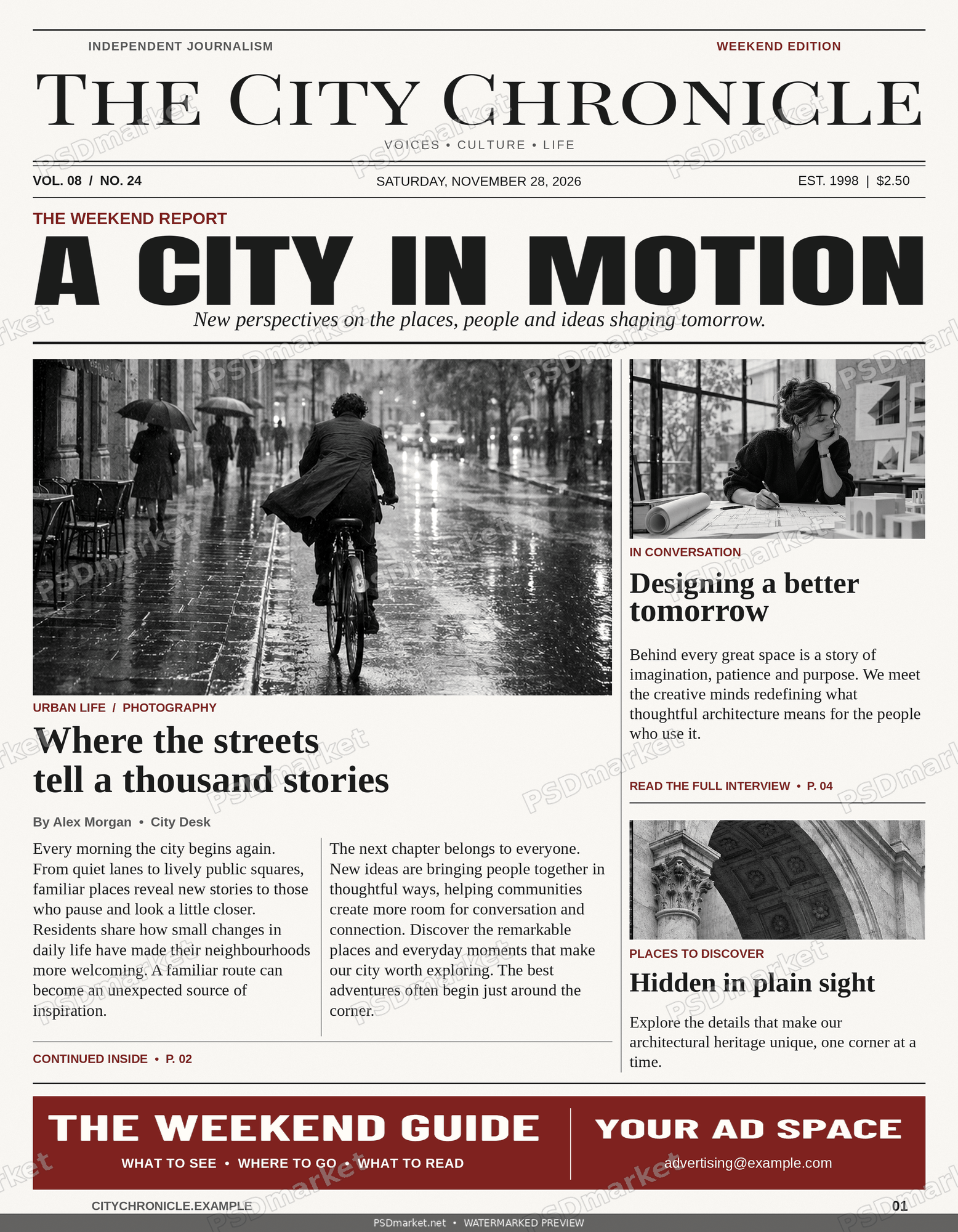
Bring the character of an independent weekend newspaper to your next creative project with The City Chronicle Newspaper PSD Template. Designed around a traditional front page, it combines confident headline typography, a refined editorial masthead, black-and-white photography and restrained burgundy accents. Whether you are creating a local publication, an editorial promotion or a memorable brand announcement, this design gives you a polished starting point without the challenge of building a layout from scratch.
A newspaper PSD template with classic editorial style
The composition balances the authority of a classic newspaper with the visual clarity of a modern editorial design. A wide main headline creates the immediate focal point, followed by a concise italic introduction and a prominent documentary-style photograph. The supporting story column features an interview portrait, a smaller architectural image and space for an additional article.
Fine dividers, consistent margins and carefully arranged columns give the front page an authentic reading rhythm. The warm off-white paper background, monochrome imagery and deep red accents create a sophisticated print-inspired look. A large advertising banner at the bottom gives you a dedicated place to promote an offer, feature a sponsor or highlight an upcoming event.
Ideal for publications, brands and creative announcements
Use this editable newspaper layout for a community newsletter, fictional newspaper front page, editorial campaign, city guide, school publication project or a corporate announcement. It is also a distinctive choice for a business presenting a new collection or telling its story through a journalistic visual format. Photographers and designers can adapt the lead story to showcase their own work, while event organizers can turn the header into a themed announcement.
The newspaper-style layout can feel familiar and credible while still being playful enough for special occasions. Replace the edition information with your own date, update the masthead to reflect your brand, and choose imagery that supports the story you want to tell. The footer can become a promotional callout or a contact section.
Customize your editorial design in Photoshop
Every headline and article text block is editable, so you can replace the sample stories, dates, page references and contact details. The three editorial photographs are provided on independent layers, making it easy to introduce your own visual content. The paper background, dividing rules and advertising banner are separated into logically named groups and layers.
The layered PSD includes 31 editable text layers. The typography uses complementary headline, serif and sans-serif fonts, with font files and licensing notices included in the package. The example articles provide a guide to layout and text length; they are not a published news report or an additional set of newspaper pages.
What you receive with your purchase
- One layered front-page Photoshop PSD file, 2625 × 3375 pixels.
- 300 ppi resolution, RGB color mode with the sRGB profile.
- 47 layers organized into seven named groups, including 31 editable type layers.
- A full-resolution clean JPEG of the design.
- Font files, license notices and a short README.
How to use the template
Download the ZIP archive, extract its contents and install the included fonts. Open the PSD in Adobe Photoshop, select the relevant text layers and replace the sample content with your own information. Adjust the supporting photos, colors or graphic elements to suit your publication. Save a copy of the editable source and export the finished artwork in your preferred format. For professional printing, check bleed, color conversion and trim requirements with your printer before sending the final artwork.
Give your next editorial or advertising project the distinctive personality of a professionally arranged newspaper front page. Download The City Chronicle and make the layout your own.
Reviews
There are no reviews yet.