
Description
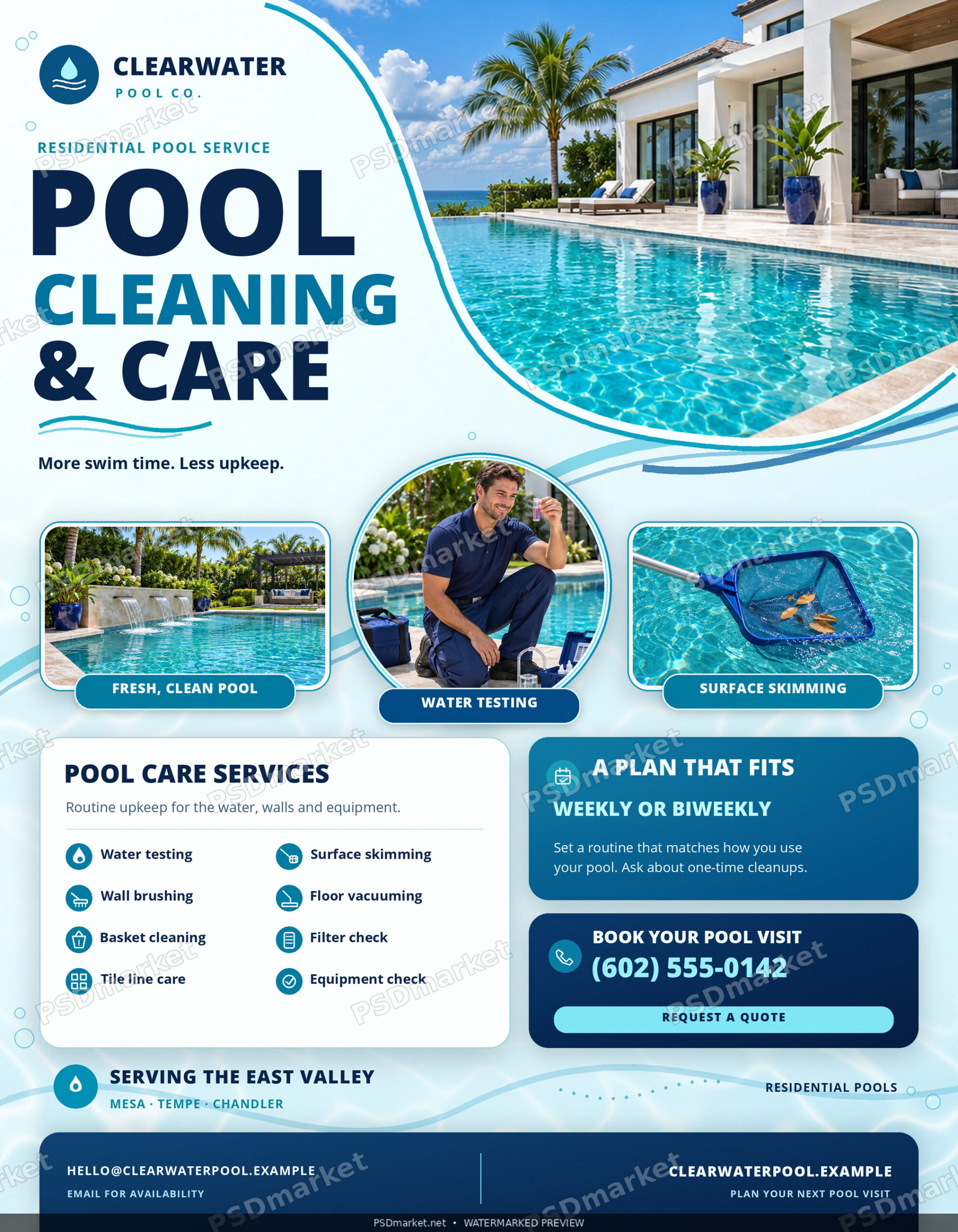
Clearwater Pool Co. is a pool cleaning service flyer PSD built around the first things a homeowner wants to know: what you do on a visit, which plan suits them, and how to book. A sunny residential pool fills the upper area, with a curving blue border leading into the service information. The smaller photographs show a clean pool, a technician testing the water and a skimmer at work. Bright blue and white keep the flyer tied to the water, while the icons and cards give readers separate places to find services, plans and contact details.
Use the design to introduce a local pool-care business, advertise a recurring route in a new neighborhood or give customers a clear overview of seasonal services. A company that mainly offers weekly care can lead with the recurring visit. A technician preparing pools at the start of summer can feature a one-time clean. Keep the offer suited to the kinds of pools and properties you work with, so customers know what they are asking for when they reach out.
Explain what a visit covers with this pool cleaning service flyer PSD
Put the tasks people recognize first. The example captions Water Testing and Surface Skimming show how to give common services their own space. Group related tasks, such as removing surface debris and emptying baskets, if those are both included. A clear list is easier to compare than a paragraph of equipment names. If a repair, seasonal cleanup or other job is quoted separately, say so in the booking details rather than making it look like part of every visit.
Distinguish the maintenance plan from the booking step
The example A Plan That Fits section mentions weekly or biweekly visits and one-time cleanups. Use it to explain how often you come and what a customer can ask for outside the recurring plan. Give people one next step, such as requesting a quote or asking for a first visit. The sample refers to the East Valley around Mesa, Tempe and Chandler; that is example coverage, not a real contractor’s service area. Replace it and all sample contact details with your own before sharing.
Hand out the full flyer after a visit, display it at a pool supply counter or share it as the first image in a neighborhood announcement. For a digital post, repeat the contact route in the caption so people do not need to copy it from the image. For a print run, check that the small icon labels read at the size you plan to distribute, and confirm trim and bleed with your printer before exporting.
What comes in the download
The ZIP contains a layered Photoshop PSD, 2625 × 3375 pixels at 300 ppi in sRGB, a clean full-resolution JPEG, a short editing guide and Open Sans Regular, Bold and ExtraBold with their license files. The headline, services, plan frequency, booking line, service area and contact details are editable text. The hero and three supporting photos are individually replaceable and use layer masks, so you can fit your own images to the curved and rounded frames.
Install the fonts before opening the PSD. Use the clean JPEG to see the supplied layout, then export a fresh image after adding your own company details. When replacing a photo, keep it in proportion and check the crop at the edges of its frame.
Reviews
There are no reviews yet.