
Description
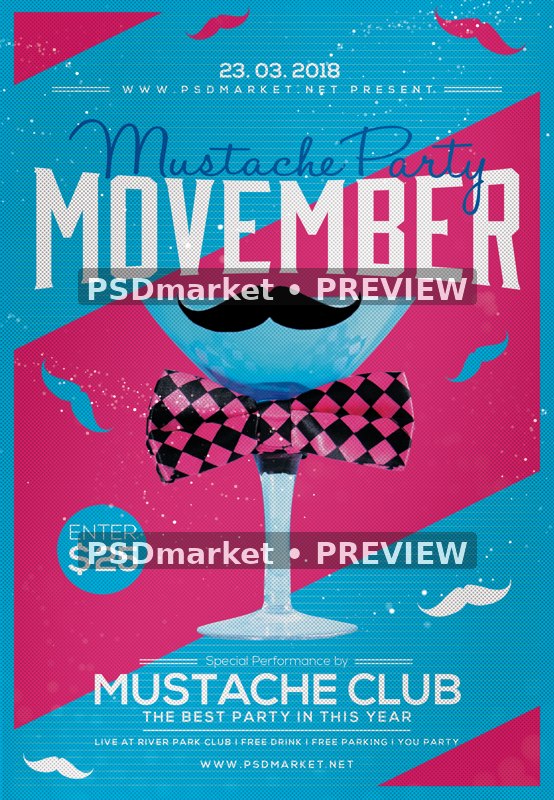
Cocktail Bow Tie Movember Mustache Party Flyer
A blue cocktail glass wears a black moustache and a pink-and-black checked bow tie against a cyan and magenta geometric background. Large white Movember lettering, script accents and scattered moustache icons complete the retro party layout.
What is included
- One layered Photoshop PSD, 1350 × 1950 px
- 300 ppi, 8-bit CMYK
- 58 layers/groups, including 11 live editable type layers
- 0 embedded smart objects
- The cocktail glass, moustache and bow tie artwork is present as raster layers. No smart-object photo replacement slot or missing photo is present.
- Named layer groups organize text, artwork and adjustments
- Canvas is approximately 4.500 × 6.500 inches; exact trim and bleed are not verified
- Readme TXT included; no font files are bundled
The preview is a reduced, watermarked rendering of the actual PSD with only its top source-branding overlay hidden locally. The original ZIP is unchanged; hide the source cover layer in Photoshop before exporting.
Photoshop-compatible editing workflow. Active fonts must be obtained separately and their licenses checked; no font files or font licenses are bundled.
All dates, times, performer or guest names, venues, contacts, prices, admission rules and offers are editable design samples, not verified current event information.
This is event-promotion artwork. No charity affiliation, fundraising beneficiary, health outcome or endorsement is established.
Artwork is raster-based where noted; embedded images are not editable 3D models or fully editable vector illustrations.
HaloHandletter: The author states that non-commercial use is free and commercial use is donationware; obtain applicable permission/terms before commercial editing.
The preview date is 23 March 2018 even though the theme is Movember; replace the sample date.
The generic readme claims 1275 × 1875 px and a photo slot; the actual canvas is 1350 × 1950 px and there are no smart objects.
Sample admission amounts and promotional offers belong to the template design and are separate from the template purchase price.
Fonts and editing
Open the PSD files in Adobe Photoshop and customize the available text layers. Font files are not included; the readme provides font-reference links. Review missing-font prompts and verify each font’s license for your intended use. Proof all content before printing or publishing.
Download and usage
Your purchase provides the original ZIP through the store’s authorized order and account download links. Review File Requirements and License & Usage before ordering.
Reviews
There are no reviews yet.