
Description
Earth Day Glowing Power Symbol Flyer PSD Template
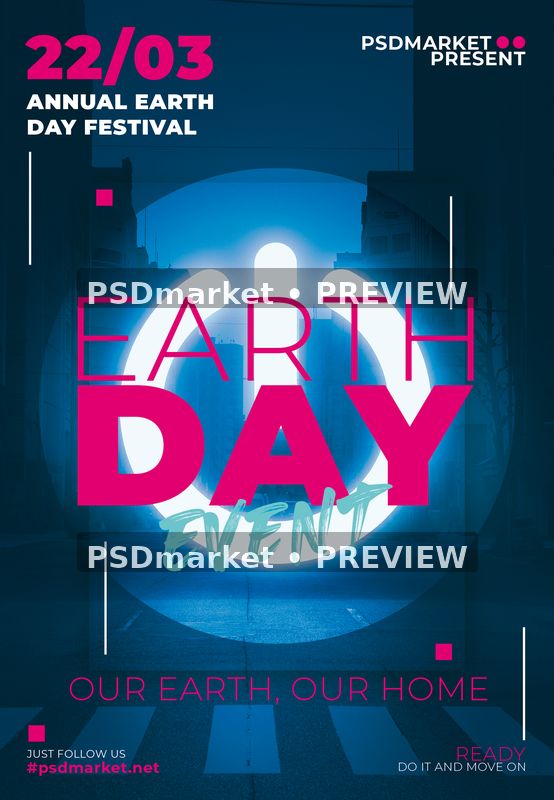
Create an eye-catching environmental event announcement with this Earth Day flyer PSD template. A glowing power symbol, dark blue street scene, and vivid magenta lettering give the layout a contemporary urban identity.
Design and layout
The large circular power graphic sits behind stacked Earth Day lettering and an energetic turquoise script accent. Slim white lines and small magenta squares frame the composition. A prominent date block occupies the upper left, with supporting slogans and social details below.
Adapt the design for an environmental awareness event, community gathering, or themed festival after replacing the sample information with confirmed details.
Included files and native specifications
The original ZIP contains one layered Adobe Photoshop PSD and readme text. The verified document measures 1350 × 1950 pixels at 300 ppi, using 8-bit CMYK color with the Coated FOGRA27 (ISO 12647-2:2004) profile. Its complete canvas is 4.5 × 6.5 inches at that stored resolution. These measurements describe the whole document, rather than a separately verified finished trim size. Delivery is digital; no printed item is supplied.
- One layered Photoshop PSD in the original ZIP.
- 48 layer records, including group markers.
- 12 native text-layer records.
- 0 smart-object layer records.
- Font files are not bundled.
Editing and sample information
The supplied artwork visibly shows 22/03 as its sample date. Verify your actual event date and correct this field before promotion. The festival heading, organizer branding, slogans, and social handle are also sample copy to review.
Text-layer records support editing their associated copy, but do not establish that every visible graphic is editable type. Inspect the document in Photoshop before adapting it; compatibility with other editors has not been verified. Save a working copy separately, then check line breaks, alignment, spacing, and contrast after replacing the sample information.
The supplied PSD initially displays a promotional cover. In Photoshop, hide the top-level layer named www.psdmarket.net to reveal the flyer artwork shown here. Only that cover was hidden for the listing export; the downloadable source and its other layer settings remain unchanged. Smaller website text within the artwork is sample content to replace when personalizing your design.
Fonts and file guidance
The readme references heaters; Montserrat. Obtain required fonts from their providers and review current license terms for your intended use. Readme references and generic free-font wording do not establish commercial rights. Substituting fonts may change wrapping or spacing, so compare your edited version with the supplied composition before exporting.
The readme dimensions conflict with the actual PSD. Use the native measurements above. Its reusable editing instructions may mention unrelated headings or image-replacement steps. Follow the actual layer structure instead of assuming every pictured element has a dedicated replacement control.
Review the file requirements and file license information before use. Included artwork and font references do not independently guarantee third-party rights.
Preview and output checks
The listing preview was exported from the exact supplied PSD in Adobe Photoshop after hiding its promotional cover, preserving the source profile on opening and converting the export to sRGB. It is a 554 × 800 pixel JPEG with two horizontal PSDmarket preview watermarks. This faithful native Photoshop export shows the revealed flyer; it is not the original saved merged cover image. The original downloadable ZIP remains unchanged.
Before production, confirm trim, bleed, safe margins, and color requirements with your printer. Stored resolution does not guarantee the effective resolution of every element. Inspect a proof for spelling, dates, contacts, and small-text readability. For online promotion, export a separate screen-ready image and review it at its intended display size.




Reviews
There are no reviews yet.