Description
Illustrated Back to School Supply Drive Flyer PSD Template
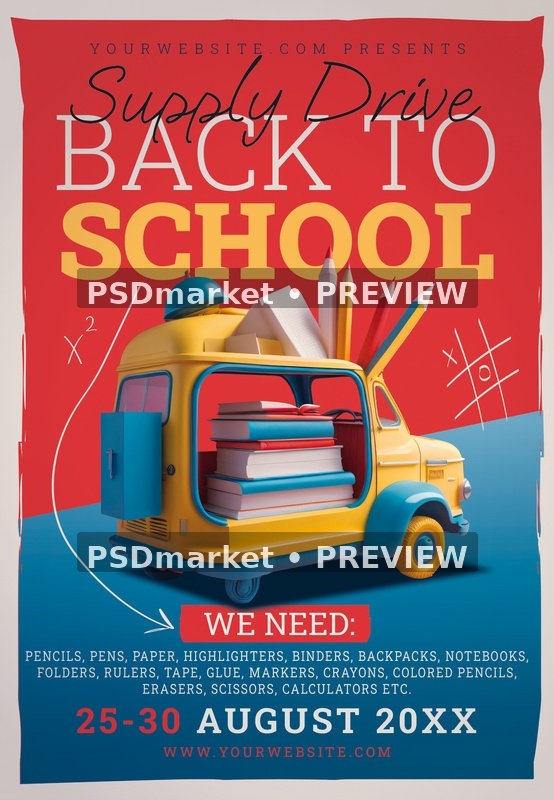
Help your collection campaign stand out with the Illustrated Back to School Supply Drive Flyer PSD Template. A bright red-and-blue layout, bold school headline, and cheerful school-supply illustration create a clear visual starting point for a community donation drive.
Design and layout
The central scene shows a small yellow-and-blue vehicle loaded with books, oversized pencils, and other school-themed objects. A red upper panel carries the Back to School title and flowing Supply Drive script. The blue lower panel contains a highlighted We Need label, a multi-line supply list, the collection dates, and a website. Hand-drawn mathematical and game marks add a classroom-inspired touch.
Make it work for your event
Adapt the design for a school-supply collection, a community organization’s seasonal campaign, a workplace donation initiative, or a neighborhood back-to-school event. Replace the sample supply list with items your organizers can accept, and make the collection period easy to read. The existing composition does not show a dedicated drop-off address field, so add collection instructions carefully or direct readers to a website with complete location and contact information.
What is included
The download is a ZIP archive containing one layered Photoshop PSD and a readme text file. The source document has a portrait canvas of 1350 × 1950 pixels, a resolution of 300 ppi, and 8-bit CMYK color. At its recorded resolution, the full canvas measures 4.5 × 6.5 inches. These specifications are taken from the actual PSD; the included readme uses different, generic size wording.
- File format: layered PSD supplied in a ZIP archive
- Canvas: 1350 × 1950 pixels, portrait orientation
- Resolution: 300 ppi
- Color mode: CMYK, 8 bits per channel
- Included files: one PSD and one readme
- Editing software: Adobe Photoshop; compatibility with other editors has not been verified
Editing and preparation
The PSD contains grouped background elements, main text, design details, supporting text, color options, and master adjustments. Inspection identified eight text-layer records, including the main headings, requested-items list, collection dates, and website. The vehicle and school supplies are part of the supplied artwork rather than a promise of separately editable vector objects. Use the readme’s general Photoshop instructions to update text and review the available color controls.
Open the PSD, review the layer groups, and save an edited working copy before exporting. Replace the sample event details with accurate information for your promotion. Check every date, price, offer, address, website, and contact line before sharing the final design. For printing, confirm the required trim size, bleed, safe margins, and color profile with your printer; the canvas dimensions alone do not guarantee a particular print setup. Digital use requires exporting and, when necessary, adapting the layout for the intended platform.
Fonts and delivery
The readme references the following font sources. Font files are not included in the archive. Install or activate the fonts you need and check the provider’s current licensing terms before using them commercially; access to some fonts may require a separate account or subscription.
This is a downloadable design template, rather than a printed product. The listing preview shows the supplied composition with a preview watermark. Event names, offers, prices, dates, and contact information visible in the artwork are sample content to review and replace for your own event.
Please review File Requirements and License & Usage before ordering. The original ZIP is preserved unchanged and configured for delivery through authorized order and account downloads.