
Description
Illustrated Women Community Day Flyer PSD Template
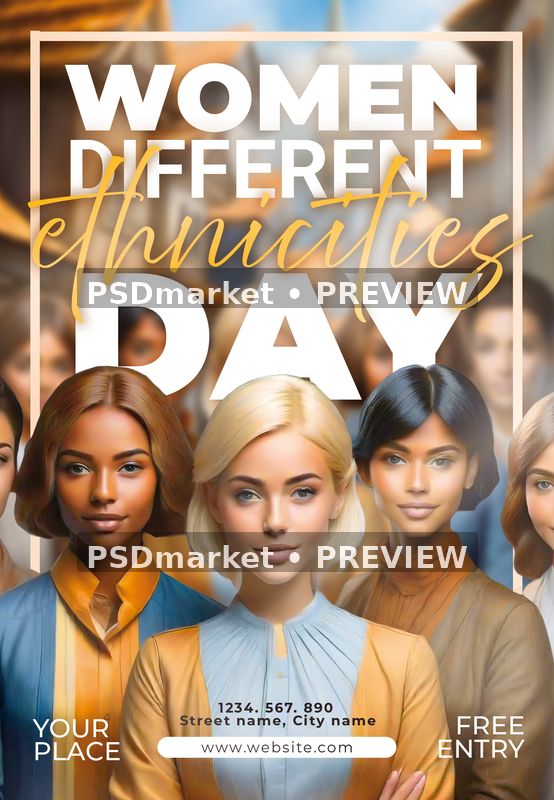
Create a community-event announcement with a group of stylized women portraits and warm blue, cream and ochre tones. The Illustrated Women Community Day Flyer PSD Template combines large white lettering with golden script inside a simple rectangular frame.
Women Different Ethnicities Day wording fills the upper half above the illustrated group. The portraits extend toward the side edges, while venue, contact, website and entry fields occupy the lower portion without a separate information panel.
Customizing the event information
The supplied title is sample event wording rather than a verified official observance. Choose the title and date appropriate to your program, and replace the free-entry statement, phone number and venue before sharing the design. Keep the central message clear when replacing the sample wording. Check every date, name, price, address and contact detail against the information approved by your organizer, and remove any sample offer that does not apply.
Included source and verified specifications
The download contains one original layered Adobe Photoshop PSD document and its readme text file. The ZIP archive is 63,169,138 bytes, approximately 63.2 MB. No separate font files, finished print PDF or alternate social-media format is included. The listing preview represents the supplied composition rather than an additional editable layout.
The native source measures 1350 × 1950 pixels in portrait orientation, with a stored resolution of 300 ppi in both directions. It uses 8-bit CMYK color. At that resolution, the full canvas measures 4.5 × 6.5 inches. These are verified document measurements; they do not independently establish a finished trim size or bleed allowance.
Layers and text editing
Inspection found 40 layer records, including group markers, and 9 native type-layer records. The native type records cover event and supporting wording. Decorative imagery and other non-type elements remain supplied artwork; their appearance does not prove they can be edited like live text. A layered PSD is not a vector illustration, and some graphic changes may require separate Photoshop work.
Adobe Photoshop is the intended editing application; compatibility with other editors has not been verified. Work on a duplicate, locate the relevant layers and review the visible result after each change. Longer names or replacement fonts can alter line breaks and spacing, so inspect both the complete composition and the smallest footer text before exporting.
Fonts and readme guidance
The readme references Roboto, Above the Beyond and Montserrat. Font files are not bundled. Obtain the required fonts from their providers and check the current license terms for your intended use. A font name or reference link is not evidence that commercial licensing is included, and generic free-font wording in the readme is not a verified license grant.
The readme states 1275 × 1875 pixels, which differs from the verified 1350 × 1950-pixel PSD. The actual PSD takes precedence. The readme also contains reusable editing instructions, which may mention an unrelated example headline or generic layer groups. Follow the inspected document structure rather than assuming that every named example, smart-object replacement feature or alternate color scheme is present.
Delivery and production checks
This is a digital design download; no printed item is shipped. The original archive is preserved unchanged. The listing image is an sRGB preview derived from the supplied artwork and carries two horizontal PSDmarket preview watermarks. Keep the untouched archive as a backup and save your customized production files separately.
Before printing, confirm trim, bleed, safe margins and color requirements with your printer. Proof spelling, contrast and fine details at the final output size. A stored 300 ppi value does not establish the effective resolution of every embedded graphic. For online use, export a separate screen-ready copy and check small-text readability at the intended display size.

Reviews
There are no reviews yet.