
Description
Indie Music Flyer PSD Template
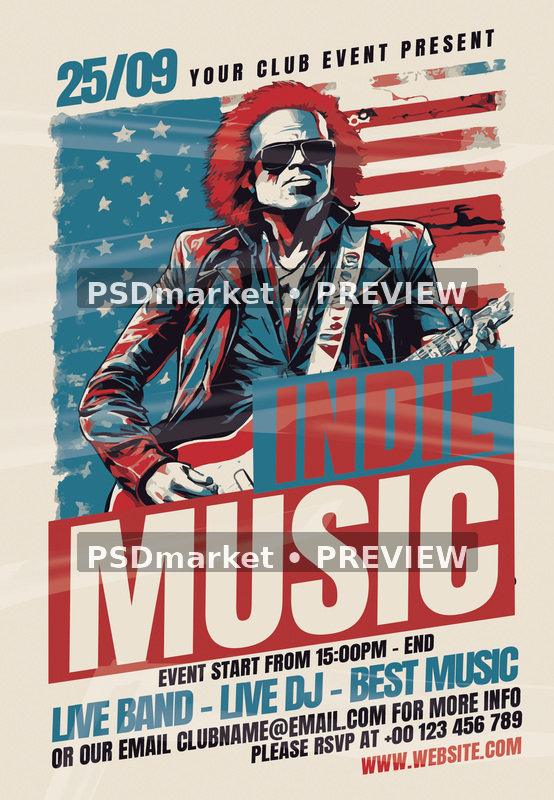
Promote a live music event with the Indie Music Flyer PSD Template. This portrait layout features a stylized guitarist in sunglasses and a leather jacket against a distressed American-flag motif. Large angled INDIE MUSIC title blocks, a cream background and a red-and-teal palette create a strong illustrated concert-poster look.
The design uses a tilted composition and layered light streaks to give the artwork a lively, energetic appearance. A date and presenter line sit above the musician, while the lower section groups the start time, entertainment line, email, RSVP telephone number and website. The supplied artwork provides a defined visual theme that can be paired with your own event wording.
What is included
- One original layered Adobe Photoshop PSD document.
- One readme text file with editing guidance and font references.
- Original ZIP archive: 19,004,921 bytes, approximately 19.0 MB.
- PSD source file: 57,556,114 bytes, approximately 57.6 MB.
- No separate JPEG, PNG, font files or social-media-size document is included in the archive.
Verified document specifications
- Native canvas: 1350 × 1950 pixels, portrait orientation.
- Stored resolution: 300 ppi horizontally and 300 ppi vertically.
- Color mode: CMYK, 4 channels.
- Bit depth: 8 bits per channel.
- Embedded color profile: Coated FOGRA27 (ISO 12647-2:2004).
- Source format: layered PSD for Adobe Photoshop.
The included readme states 1275 × 1875 pixels and describes a 4 × 6 inch layout with 0.25-inch bleed. That generic statement differs from the inspected PSD header. The native dimensions listed above describe the actual supplied document. Confirm the required trim size, bleed, safe area and color profile with your print provider before exporting; do not assume that the readme defines this file’s final print boundaries.
Customize the design
Open the PSD in Adobe Photoshop and save a working copy before editing. The inspected document contains text layers and named groups for the main headline, supporting details and design elements. Use the Layers panel to find the wording you want to replace, then review the composition after each change. The readme includes generic image-replacement and adjustment instructions, including a reference to a “Trance” layer; check the actual document structure rather than assuming every instruction applies to this particular design.
Update the 25/09 date, YOUR CLUB EVENT PRESENT line and INDIE MUSIC headline to match your event. Replace the LIVE BAND – LIVE DJ – BEST MUSIC line, placeholder email, RSVP number and website. The sample start-time text reads 15:00PM; correct it to a consistent format such as 15:00 or 3:00 PM and specify the actual finish time if relevant. Add a clear venue address if your audience will need it.
Fonts and software
The supplied readme references Anton through Google Fonts. Font files are not included in the ZIP. Obtain the appropriate fonts from their providers and review the applicable licenses before editing. If you use substitute fonts, inspect spacing, line breaks and alignment carefully. Adobe Photoshop is the intended editing application; compatibility with other editors has not been verified.
Ideas for using this template
Use the layout for an indie music evening, live-band performance, guitar showcase, local concert or music-themed party. The flag backdrop gives it a specific Americana-inspired visual character, so consider whether that suits your event. Keep the headline compact enough for the angled blocks and make contact details readable at the final printed or screen size.
Download and print preparation
This is a digital template; no physical item is shipped. The original ZIP is provided through PSDmarket’s authorized order and account download links. The listing preview is rendered from the supplied PSD and carries PSDmarket preview watermarks; the original source archive is preserved unchanged. Export your customized production files separately and keep the untouched download as a backup.
A stored 300 ppi value does not guarantee the effective resolution of every embedded element. Check the finished artwork at output size, proof colors and verify all event information before printing. Create a separate screen-ready export for online promotion and check that smaller text remains readable. Please review File Requirements and License & Usage before ordering.
Reviews
There are no reviews yet.