
Description
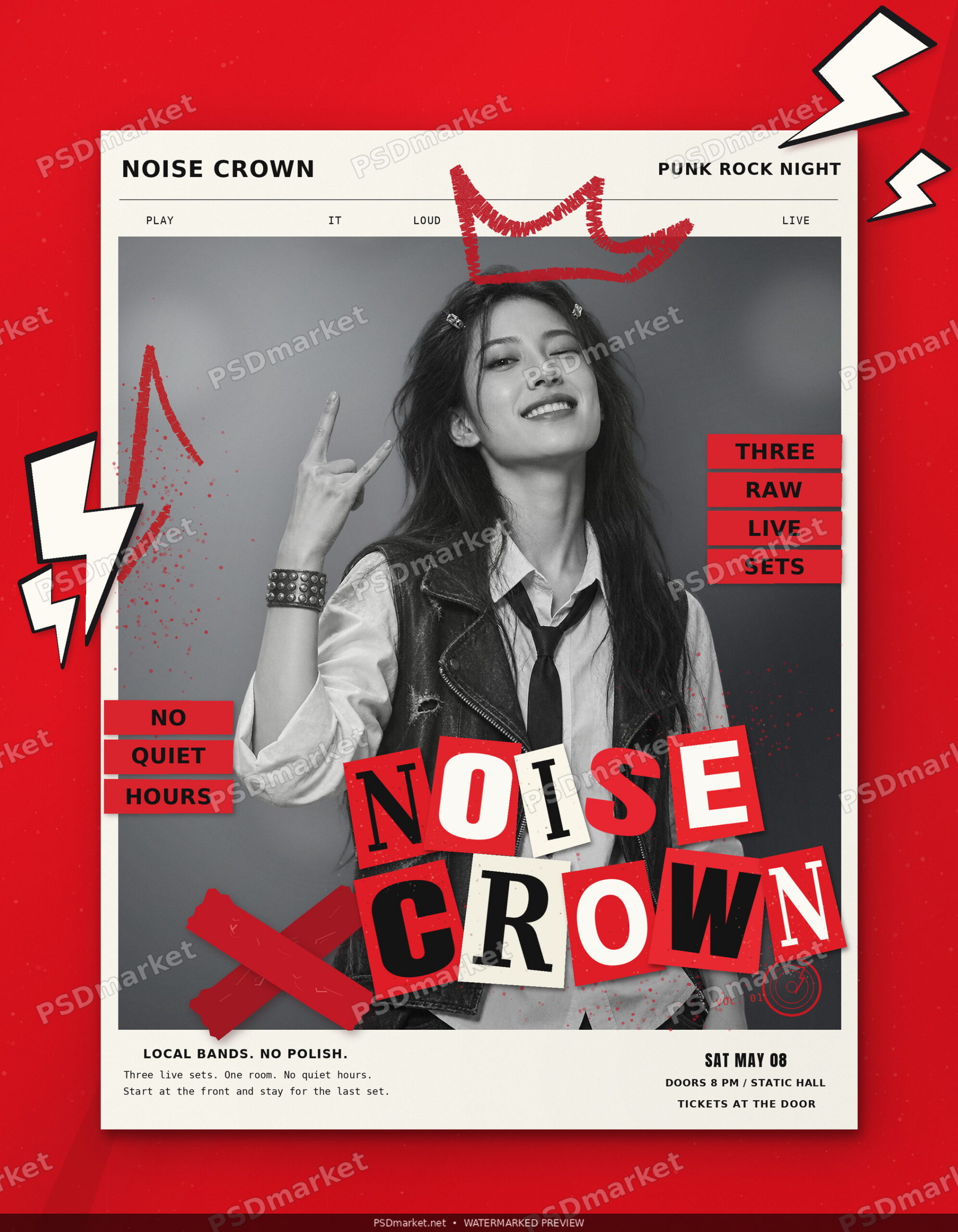
Noise Crown is a punk rock flyer PSD with the look of a gig announcement pulled from a paper zine. A raised white sheet sits on worn scarlet, with a broad shadow that gives the paper a little lift. A grayscale performer throws the horns beneath a painted red crown, and outlined lightning stickers frame the action. The cutout-style NOISE / CROWN title carries the energy of a DIY gig wall without making the practical information hard to find.
Use the design for a punk show, a garage-rock bill, a benefit gig or the first night of a small venue’s live series. It also suits an album-release show where the band’s name needs to carry the flyer on its own. The sample Punk Rock Night line tells people what they’re walking into. For a mixed bill, that line can name the series, label or promoter instead. Keep it short enough that it reads as a label, leaving the main title to do the announcing. For a recurring show, keep the series name in the big lettering and use the date and billing to distinguish each edition.
Make the lineup and the doors time clear
Use the two title lines for your event name or headliner. If the artist’s name is long, move the less important wording into a smaller line rather than squeezing the big letters until they lose their character. The sample says Three Live Sets; keep a set count if it helps explain the night, or give that space to support artists. For a packed bill, the flyer can introduce the headliner while the event page carries the complete lineup and set times.
Tell people how to get in
Update the venue and date together, and label Doors separately if the first band starts later. For a basement or multiroom venue, include the room or entrance details in the event listing where guests can refer to them again. The sample ends with Tickets at the Door. Keep it only if walk-ups are welcome; use Advance Tickets or Free Entry if that describes the actual show. Put any age restrictions or entry requirements where guests can read them before they arrive.
Post it for the people who will see it
The vertical composition works as a venue-door poster, a band’s show announcement or cover artwork for a gig listing. For digital promotion, preview it at phone size so the date, venue and ticket instruction still read beneath the large lettering. Repeat those details in the caption for anyone who sees a cropped preview. If you are printing and posting copies, confirm your printer’s final trim and bleed before exporting.
What is in the download
The ZIP includes a layered Photoshop PSD (2625 × 3375 px at 300 ppi, with an embedded sRGB color profile), a clean JPEG of the supplied design, a short editing guide, and Anton Regular, DejaVu Sans Bold, DejaVu Sans Mono Regular, and DejaVu Serif Bold with their licenses. Update the editable English event details and export a new image from your working copy.
Reviews
There are no reviews yet.