Description
Red Power Tools Sale Flyer PSD Template
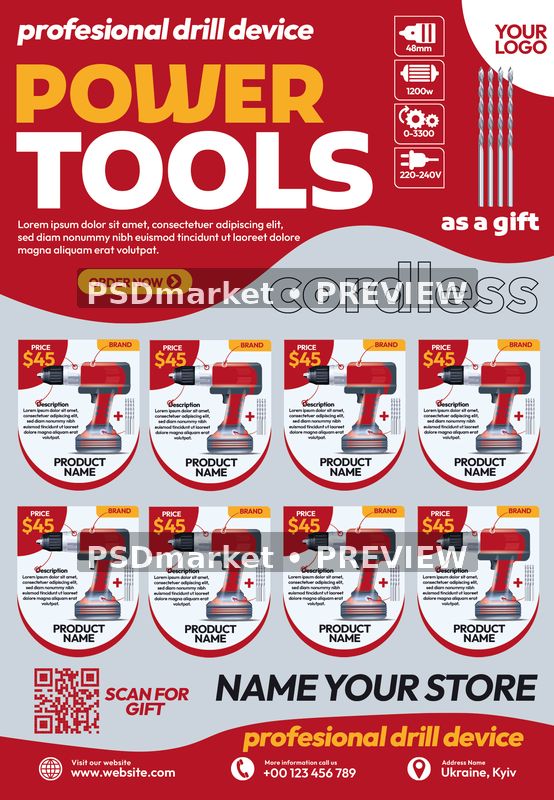
Present a hardware promotion with a red, white, yellow, and gray power-tools layout. A large Power Tools heading sits above eight repeated drill product cards, while small technical icons, bold prices, and a call-to-action area support a retail catalog-style composition.
Design and layout
The header combines a sample logo field, feature symbols, and a gift accessory image. Curved gray bands separate the heading from the product grid. A QR-code area, store-name field, and contact footer complete the lower portion with clear locations for customized shop information.
Use this composition for a hardware store sale, tool catalog promotion, or product-offer announcement. Preserve the hierarchy between the main heading and the supporting information when adapting the design. The preview shows the supplied artwork and provides a practical guide to the balance of illustration, color, and typography.
Included files and verified specifications
The download contains one layered Adobe Photoshop PSD and its readme text inside the original ZIP archive. The actual document measures 1350 × 1950 pixels at 300 ppi, with 8-bit CMYK color. The full native canvas is 4.5 × 6.5 inches at that stored resolution. This measurement describes the complete document, rather than a separately verified finished trim size.
- Format: layered Photoshop PSD supplied in a ZIP
- Native canvas: 1350 × 1950 pixels
- Stored resolution: 300 ppi
- Color: CMYK, 8 bits per channel
- Support file: readme with font references
- Delivery: digital design files; no printed item
Editing and sample content
Native inspection found 253 layer records, including group markers, and 77 text-layer records. Text records allow editing of their associated copy, but do not prove that every visible headline, decorative mark, or illustration is editable type. No smart-object layer records were identified. Inspect the actual layer structure in Photoshop before making changes; compatibility with other editors has not been verified.
All brands, product names, prices, dimensions, power ratings, voltage, gift promises, shop details, and product descriptions are sample content. Verify every specification and offer against the real products. Replace and test the QR code; no tools or physical goods are included.
Keep an untouched copy of the download and save your working version separately. After replacing copy, review line breaks, alignment, spacing, and contrast. Check small supporting text at final size and the main message at reduced size.
Fonts and source notes
The readme references these font sources: Outfit; Kufam. Font files are not included. Obtain any required fonts from an appropriate provider and review the current license terms for your intended use. A readme link does not establish that a font is free or that commercial rights are included. Native font-resource names can also include unused or substitution fonts.
The readme states a generic 1275 × 1875 pixel size, which conflicts with this PSD’s verified 1350 × 1950 pixel canvas. Its generic image-replacement, adjustment-group, and example-headline instructions may not match this particular source. Follow the actual document and layer records rather than assuming every referenced feature is present.
Preview and production
The listing preview is a 554 × 800 pixel JPEG rendered from the saved native composition, converted from its embedded profile to sRGB, and marked with two horizontal PSDmarket preview watermarks. The downloadable ZIP remains unchanged. The preview is for reviewing the design and is not a substitute for the layered production source.
Before print production, confirm trim, bleed, safe margins, and color requirements with your printer. A stored resolution value does not guarantee the effective resolution of every embedded element. Export and inspect a proof, checking spelling, numerical details, and contact information. For digital promotion, create a separate screen-ready export and review readability at its intended display size.