
Description
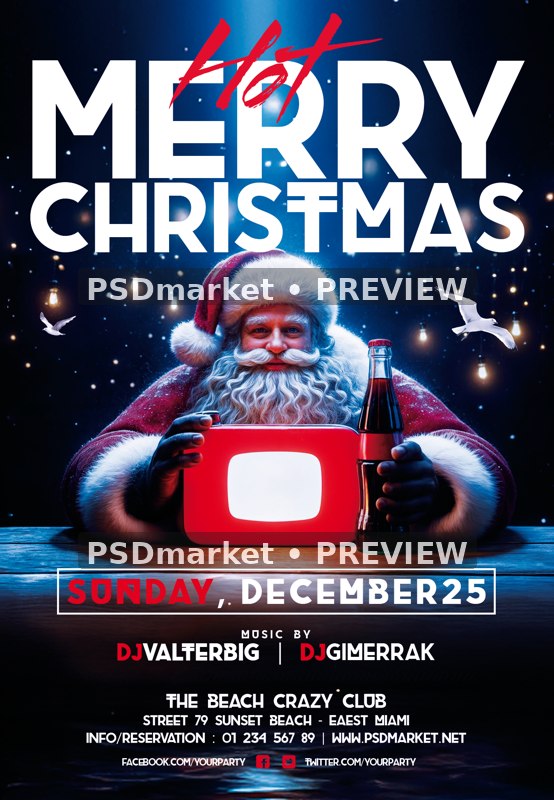
Santa Tabletop Merry Christmas Flyer
Santa sits at a wooden table with a red tabletop prop and a dark bottle beneath festive lights, paired with large white Merry Christmas typography and red accents.
What is included
- One layered Photoshop PSD, 1350 × 1950 pixels, 300 ppi, 8-bit CMYK.
- 33 layers and groups, including 8 live editable text layers.
- One embedded smart object contains the complete raster scene; individual people, characters and props are not separate editable 3D models or vector illustrations.
- Canvas at the saved resolution: 4.5 × 6.5 inches. Confirm final trim, bleed and printer requirements.
- One readme TXT is included. No font files, separate JPEG or additional social-size PSD is supplied.
- Actual text fonts: Brig, CenturyGothic, MyriadPro-Regular, Roboto-Regular, Streetbrush.
The preview is a reduced, watermarked version of the actual stored PSD composite. The original ZIP and PSD are unchanged.
Sunday, December 25, the beach-club venue, DJ names, social URLs and contact details are editable sample copy. Confirm the calendar and correct the source address spelling when customizing.
The illustrated bottle and red prop do not establish a beverage brand, broadcast-platform affiliation or endorsement.
All dates, times, performer names, contacts, admission amounts and promotional offers are editable source samples, not verified current event information. The template purchase price is separate from any admission amount in the artwork.
The generic readme describes 1275 × 1875 pixels and broad photo-replacement instructions; the verified canvas and actual layer contents above describe the delivered PSD.
Font files and font licenses are not included. Obtain the fonts and permissions required for your intended use; readme download links do not establish that every font is free for commercial use.
Fonts and editing
Open the PSD files in Adobe Photoshop and customize the available text layers. Font files are not included; the readme provides font-reference links. Review missing-font prompts and verify each font’s license for your intended use. Proof all content before printing or publishing.
Download and usage
Your purchase provides the original ZIP through the store’s authorized order and account download links. Review File Requirements and License & Usage before ordering.


Reviews
There are no reviews yet.