
Description
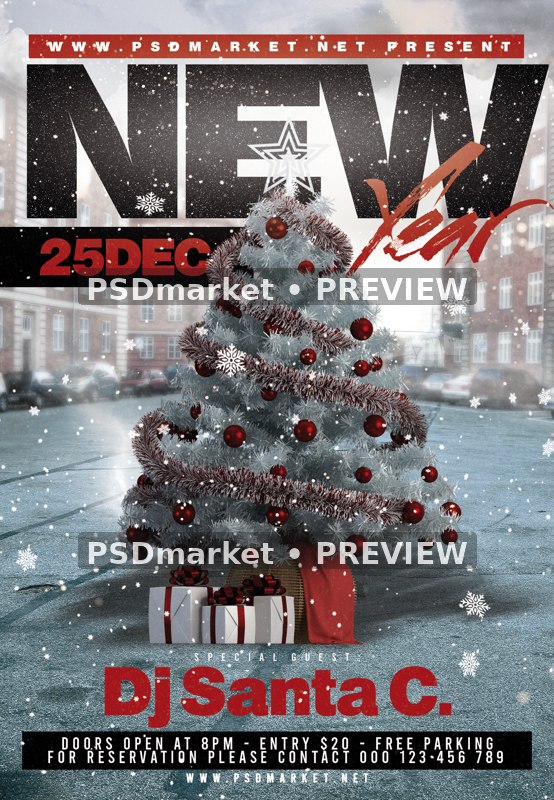
Snowy City Tree New Year Party Flyer
A snow-covered Christmas tree with red ornaments, wrapped gifts and a red sack stands in a wintry city square beneath large black New lettering and red Year script.
What is included
- One layered Photoshop PSD, 1350 × 1950 pixels, 300 ppi, 8-bit CMYK.
- 49 layers and groups, including 8 live editable text layers.
- Canvas at the saved resolution: 4.5 × 6.5 inches. Final trim, bleed and printer requirements must be checked.
- No smart objects are included. The main snowy city and tree artwork is rasterized; the headline and event information remain live editable type.
- ZIP includes one PSD and 1 documentation text file. No font files or additional social-size PSD is included.
- Actual text fonts: Bebas-Regular, MVSansBold, Streetbrush.
The reduced, watermarked preview uses the validated local PSD layer rendering with only the obstructing top pixel-logo layer hidden. Other source layer visibility is preserved. The original ZIP and PSD are unchanged.
The New Year headline accompanies December 25 sample copy. DJ Santa C., 8 PM, $20 entry, contact and PSDmarket website details are editable placeholders.
Dates, times, names, contacts, admission amounts and offers shown in the design are editable source samples, not verified current event information. The template purchase price is separate from any event admission amount.
Use the verified PSD specifications above. Generic readme dimensions and layer-editing instructions may describe a different layout; inspect the actual layer structure before making changes.
Font files and font licenses are not bundled. Obtain the fonts and permissions needed for your intended use; a font-reference link does not establish free commercial use.
Fonts and editing
Open the PSD files in Adobe Photoshop and customize the available text layers. Font files are not included; the readme provides font-reference links. Review missing-font prompts and verify each font’s license for your intended use. Proof all content before printing or publishing.
Download and usage
Your purchase provides the original ZIP through the store’s authorized order and account download links. Review File Requirements and License & Usage before ordering.



Reviews
There are no reviews yet.