
Description
Sprint Day Stadium Runner Flyer PSD Template
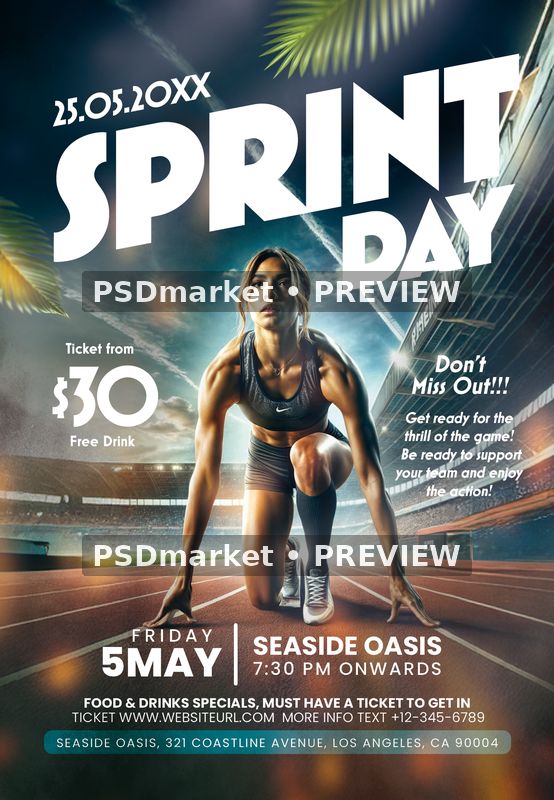
Sprint Day Stadium Runner Flyer PSD Template places an athletic runner at a track starting line beneath a large, angled white SPRINT DAY headline. Stadium seating, floodlights, a dramatic evening sky, and palm leaves frame the central figure. The dark teal background and warm track lighting create strong contrast with the white event information, while a teal strip holds the address at the bottom.
The layout has a clear sports-event structure: a date above the title, a ticket-price block to the left of the runner, promotional text on the right, and a wide date-and-venue band near the footer. It can provide a starting layout for a running event or athletic promotion when its sample content is replaced with accurate information. The central runner illustration is supplied artwork, while the title and event details have separate type layers.
Customize the supplied design
The supplied dates conflict: the top reads 25.05.20XX, while the lower band reads Friday 5 May. Replace both locations together. The $30 price, free-drink wording, Seaside Oasis venue, 7:30 PM start, ticket website, phone number, and address are demonstration content. Review the sports copy about supporting a team as well, so it fits the specific event you are promoting.
The document contains one smart-object layer. Check its contents before replacing the central artwork, and preserve the runner’s relationship to the headline and track.
Included files and document specifications
The original download contains one layered Adobe Photoshop PSD and a readme text file. The document measures 1350 × 1950 pixels, with 300 ppi stored horizontally and vertically. Its complete portrait canvas measures 4.5 × 6.5 inches at that resolution. It is an 8-bit CMYK document with an embedded Coated FOGRA27 (ISO 12647-2:2004) color profile.
- 51 layer records, including group-end markers.
- 16 live text-layer records in the original source.
- 1 smart-object layer records detected.
- No bundled font files or separate print PDF.
- Digital ZIP delivery; no physical prints are supplied.
Fonts and working with the PSD
The readme lists Mostra Nuova and Poppins. The actual text records use Mostra Nuova Bold and Heavy alongside several Poppins weights. Obtain required fonts from their respective providers and review their applicable usage terms. The readme’s generic heading does not establish that every font is free for every use. Substituting a font can change character widths, spacing, line breaks, and alignment.
Adobe Photoshop is the intended editor. Keep the original archive and work on a duplicate of the PSD. Follow the actual layer structure when changing text, colors, or images. The readme includes reusable instructions referring to a Trance text layer and a blurred-image workflow, so those examples should not be read as a precise inventory of this particular composition.
Preview and print preparation
The preview shows the original stored composition, converted from its embedded CMYK profile to sRGB for screen display. The full portrait canvas is retained, with two horizontal PSDmarket preview watermarks added for the listing. The downloadable ZIP preserves the original source. Screen colors can differ from a printed result.
The readme states 1275 × 1875 pixels, which differs from the inspected document size above. A final trim size and bleed allowance have not been independently established. Confirm margins, color settings, and export requirements with your printer, and inspect a final proof. Review the file requirements and file licenses before using the template.




Reviews
There are no reviews yet.