
Description
Summer Break Tropical Flyer PSD Template
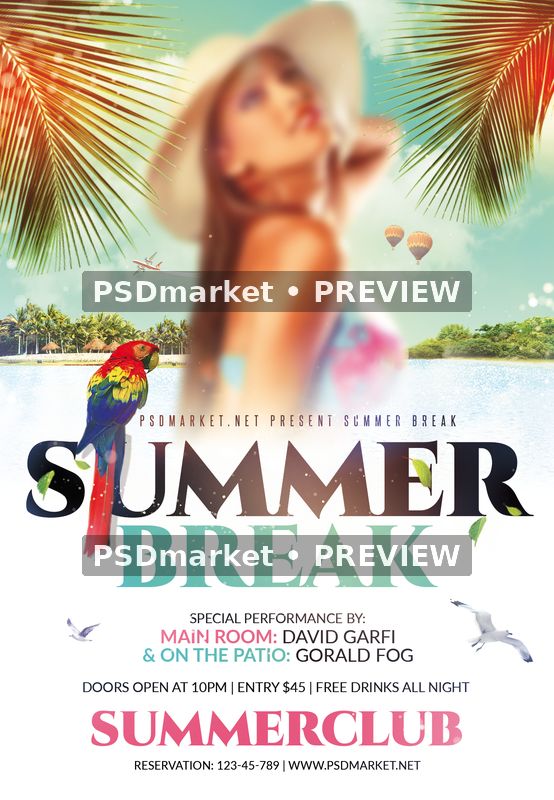
Summer Break Tropical Flyer PSD Template combines a bright holiday setting with a clean lower information area. Palm fronds frame the upper corners, a colorful parrot sits beside the headline, and a pale turquoise sky meets a distant tropical shoreline. A softly focused portrait forms the main image area above the large SUMMER BREAK title. Black and mint lettering, small coral accents and the white background create an airy seasonal composition.
Use the layout to prepare a summer club night, a beach-inspired venue promotion or a seasonal party announcement. The upper half establishes the tropical mood, while the lower half gives the event name and supporting details their own space. A separate venue line near the bottom can introduce your club or event brand. The composition already includes decorative birds, a small aircraft and a balloon, which extend the travel and holiday theme.
The portrait is a supplied soft-focus image placeholder. Its appearance is intentional in the preview, and the original Photoshop file includes a marked image smart object for replacement. The readme describes editing that object and placing your own image inside it. Select photography that fits the tall central area and review how it meets the palm framing, horizon and title after you save the replacement.
The original contains eight live text layers, covering the main headline, presenter, venue, performers and practical event information. Background details, design details, color options and master adjustments are separated into named groups. This structure gives you a clear starting point for changing the event copy and balancing the artwork with your venue colors. Retain the generous light areas when adding information so the smaller lines remain comfortable to read.
Files and Photoshop specifications
The download includes the original layered PSD and a text readme inside a ZIP archive. The Photoshop canvas measures 1350 × 1950 pixels at 300 ppi, in 8-bit CMYK with the embedded Coated FOGRA27 profile. At that resolution, the full canvas is 4.5 × 6.5 inches. The older readme lists a different canvas size; use the actual document dimensions when setting up your output. Keep a separate export for each intended format so later changes to the layered design can be applied consistently across your promotional materials.
The original uses Cinzel-Black, Lato-Regular, Lato-Bold and SteelfishRg-Regular. The readme provides references for the Cinzel, Lato and Steelfish font families. Font files are not included in the ZIP. Install the required fonts from suitable sources and review their current licenses before editing the live text for your own project.
Customize your event details
Update the sample performer names, room descriptions, opening time, entry price, drinks offer, reservation number and website. Keep only the offers that apply to your event, and check that all remaining information agrees across the title and footer.
Work on a copy of the PSD in Adobe Photoshop and keep the layered source for later revisions. Review the named groups, update the text and image areas you need, and inspect the finished composition at full size. Before exporting, check every small line as well as the headline. Sample addresses, presenter names and promotional offers can remain easy to overlook in a detailed composition. Use a final proof to confirm spelling, readable contact information and consistent dates before sending the finished artwork to your audience. For printed copies, confirm the final trim, bleed and color requirements with your print provider. For online promotion, export a separate web image in the dimensions required by your chosen platform.

Reviews
There are no reviews yet.