Description
Sunburst World Youth Skills Celebration Flyer PSD Template
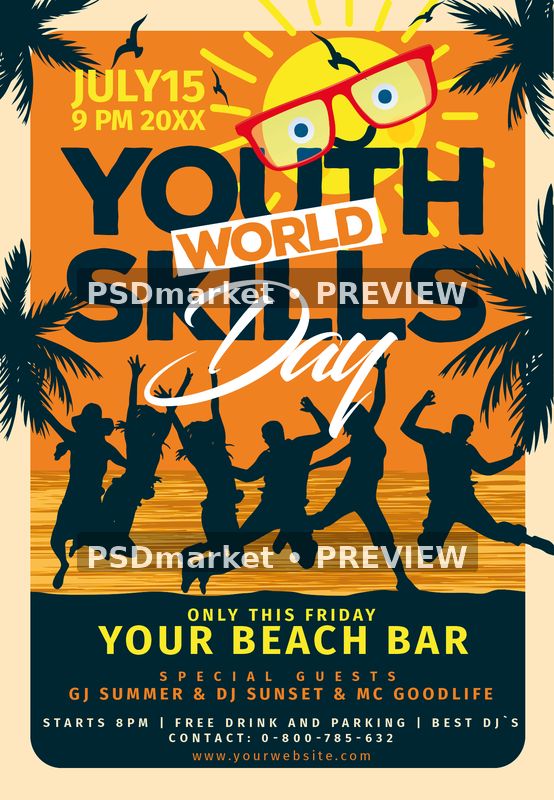
Create a lively World Youth Skills Day announcement with dark jumping silhouettes against an orange sunburst. A red glasses illustration sits above oversized dark lettering, while white Day script crosses the center and palm silhouettes frame the edges.
The sample July date occupies the upper left, with the jumping figures below the headline. A rounded dark lower panel groups a Friday callout, venue name, guest names, event offerings, contacts and website. The bold warm-and-dark palette keeps the announcement visually energetic.
Customize the event information
Replace the date, year, Friday reference, venue and guest names, and reconcile the differing hours. Verify all refreshments and parking claims, and adapt the generic beach-party wording to the actual skills program and intended audience. Keep the most important details concise and preserve the existing visual hierarchy. Check the finished composition at both working size and a smaller viewing size, paying particular attention to narrow labels and footer text. This template provides the visual starting point; the organizer remains responsible for accurate final event information.
Included files and native specifications
The original ZIP contains one layered Adobe Photoshop PSD and a readme text file. The verified portrait canvas is 1350 × 1950 pixels, with 300 ppi stored horizontally and vertically, 8-bit CMYK color, and a full-canvas measurement of 4.5 × 6.5 inches at that resolution. The embedded color profile is Coated FOGRA27 (ISO 12647-2:2004). These specifications describe the actual source document.
- One Photoshop PSD source and its readme.
- 44 layer records, including group markers.
- 11 native text-layer records.
- 0 smart-object layer records.
- No bundled font files or separate print PDF.
- Digital download; no physical printed product.
Editing and source structure
The native type records include the World Youth Skills Day title, date, Friday label, venue, guest names, event details and website. Their presence supports editing the associated text, but does not establish that every visible headline, decorative element, or illustration is live type. Layer names can retain earlier sample wording. Review the actual visible content in Photoshop before making changes, and do not assume that all artwork is vector-based or independently adjustable.
Keep an untouched backup and work on a duplicate. Adobe Photoshop is the intended editing application; compatibility with other editors has not been verified. Check layer visibility, grouping, and the appearance after each adjustment. Smart-object records, where present, do not by themselves verify a ready-made photo-replacement workflow. The readme contains reusable instructions and may mention an unrelated example title or group, so follow the supplied layer structure.
Fonts and production checks
The readme references Nexa Rust Sans, Blacksword, Fira Sans. Font files are not included. Obtain the appropriate fonts from their providers and check their current license terms, including commercial-use conditions and any account or subscription requirements. A readme link and generic free-font wording do not establish a license grant. Substituting a font can change spacing, wrapping, and the balance of the design.
The readme’s 1275 × 1875 pixels wording differs from the actual 1350 × 1950-pixel document. Use the native measurements above; a finished trim size or bleed allowance has not been independently verified. A stored 300 ppi value also does not guarantee the effective resolution of every placed graphic. Confirm your printer’s requirements for size, color, safe margins, and export format, then inspect a proof before production.
Preview and delivery
The listing preview is rendered from the supplied artwork with native color-profile conversion to sRGB and two horizontal PSDmarket preview watermarks. It shows the overall design rather than a separately supplied print-ready export. The original downloadable ZIP remains unchanged. After customization, export a production copy separately and create a screen-ready version if needed. Recheck spelling, dates, prices, contact information, and any promotional promises before using the result. Review the file requirements and file licenses before use.