
Description
Sushi Time Restaurant Flyer PSD Template
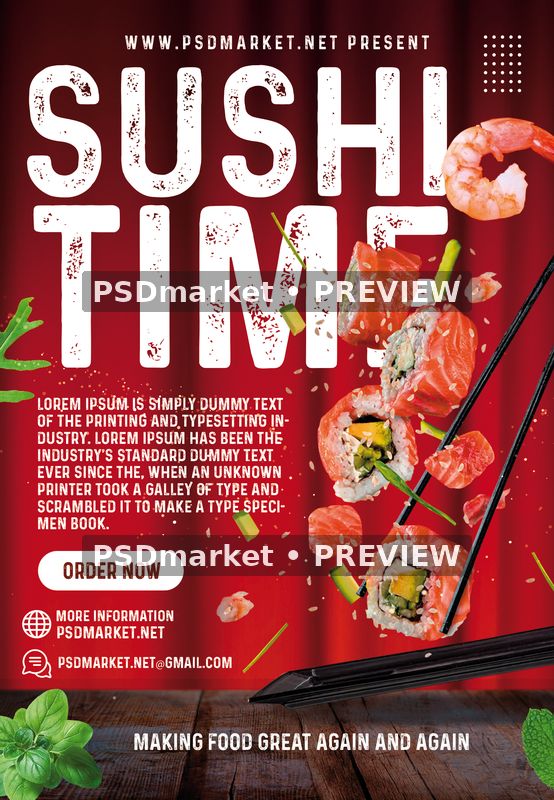
Sushi Time Restaurant Flyer PSD Template builds a restaurant promotion around a large SUSHI TIME heading, an ORDER NOW call to action, and separate areas for a website, email address, and supporting description. The portrait layout gives the main food-themed message a clear position above the smaller contact information. It provides a starting point for a sushi restaurant announcement, takeaway promotion, or food event advertisement.
A deep red background, oversized distressed white lettering, flying sushi ingredients, and a wooden tabletop establish the food-focused look. Salmon, shrimp, herbs, and dark chopsticks surround the headline and ordering information.
Customize the supplied information
Replace the sample headline, slogan, restaurant details, email, website, and filler paragraph with your own information. The source includes Lorem Ipsum text and PSDmarket contact placeholders, which need review before any finished promotion is distributed. Match the call to action to your actual ordering route and include only offers or service details that your restaurant provides.
Keep the main message short enough to fit the existing text area. After changing names, dates, or contact details, check line breaks, alignment, spacing, and contrast at both full size and a smaller preview size. Longer copy may need a different arrangement. Review the complete canvas so that secondary text and old placeholders are not overlooked.
Included source and verified specifications
The original ZIP contains one layered Adobe Photoshop PSD and one readme text file. The verified document measures 1350 × 1950 pixels and stores 300 ppi horizontally and vertically. Its complete canvas is therefore 4.5 × 6.5 inches at the recorded resolution. The source is 8-bit CMYK with an embedded Coated FOGRA27 (ISO 12647-2:2004) color profile.
- One portrait Photoshop source with editable text.
- 46 layer records, including group-end markers.
- 40 layers and groups excluding end markers.
- 9 text layers and 0 detected smart-object layers.
- No bundled font files or separate print PDF.
- Digital ZIP delivery; no physical product is supplied.
Fonts and editing workflow
Open the PSD, hide its top promotional cover, and review the artwork before editing. Save your customized project separately so that the original ZIP remains available for comparison.
The readme links to Prequel. Original text-layer inspection identifies PrequelDemo-Regular and MyriadPro-Regular, so Myriad Pro is an additional font dependency beyond the readme link. Obtain any missing fonts from their providers and review their applicable usage terms. A replacement typeface can change letter widths, line breaks, and alignment, so inspect the layout again after resolving fonts.
The native preview shows the food imagery clearly, with soft motion and depth effects around selected decorative elements. Layer names alone do not establish whether an asset is a replaceable smart object. This file contains no detected smart-object layers; work from the actual pixel layers and groups when adapting the artwork.
Preview and production
The product preview is exported in Adobe Photoshop from a temporary copy that preserves the original cached text appearance. Only the promotional cover is hidden. A duplicate is flattened and converted to sRGB for the preview, retaining the full canvas and adding two horizontal PSDmarket preview watermarks. The downloadable original keeps its editable text and unchanged source artwork.
The readme describes a 1275 × 1875-pixel setup that differs from the verified document dimensions. A final trim size and bleed allowance have not been independently established. Confirm margins, color handling, and export requirements with your printer before production. For digital promotion, prepare an appropriately sized RGB export and check the actual crop and text visibility in its intended placement. Review the file requirements and file licenses before using the template.
Reviews
There are no reviews yet.