
Description
Taco Tuesday Food Flyer PSD Template
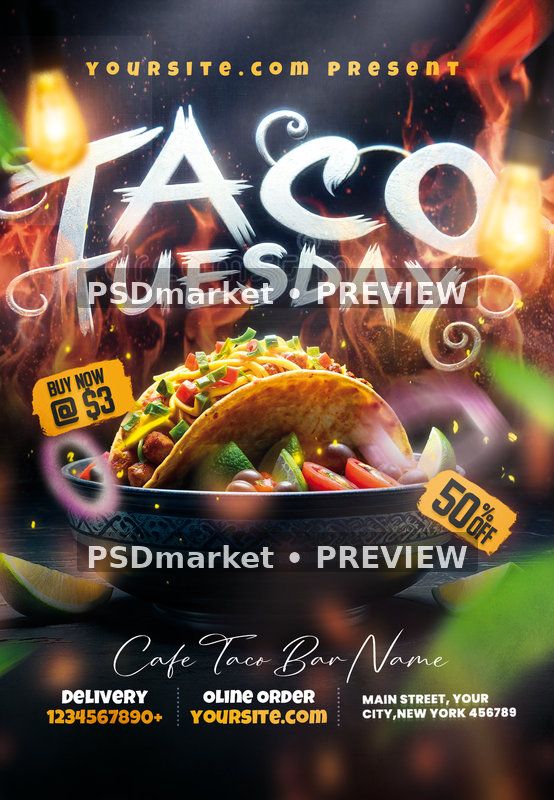
Promote a food special with a vivid Taco Tuesday composition featuring a filled taco in a dark serving bowl. Warm hanging lights, colorful ingredients, glowing accents, and a dark background create an energetic restaurant-promotion look.
Design and layout
Large white Taco lettering and a flowing Tuesday line sit above the food image. Small yellow offer tags appear at the sides, while a script venue-name field and grouped delivery, ordering, and address details fill the bottom. The central food visual remains the main focal point.
Use this visual direction for a Taco Tuesday promotion, restaurant special, or casual food-event announcement. Keep the most important event information short enough to follow the existing hierarchy. Where the sample artwork includes an activity, offer, admission detail, or date, replace it with information that accurately describes your own event. The preview is a useful guide to the supplied composition and its balance of illustration, headline, and supporting copy.
What is included
The download is the original ZIP archive containing one layered Photoshop PSD and its readme text. The actual PSD header records a portrait canvas of 1350 × 1950 pixels, 300 ppi resolution, and 8-bit CMYK color. At the stored resolution, the full canvas measures 4.5 × 6.5 inches. These are native document measurements, rather than an assumed finished print size.
- File format: layered Photoshop PSD in a ZIP archive
- Canvas: 1350 × 1950 pixels
- Resolution: 300 ppi
- Color mode: CMYK, 8 bits per channel
- Included support material: readme text with font references
- Delivery: downloadable design files
Editing the source
Inspection identified 57 layer records, including group markers, and 9 native text-layer records. Open the source in Adobe Photoshop or a compatible editor and inspect the layer groups before editing. Native text records support changes to their associated copy, but decorative lettering, illustrations, and other graphics should not automatically be treated as editable type. Keep an untouched copy of the download and save your customized version separately.
Replace the presenter, headline details, date, time, venue, contact information, and any sample offers that apply to your version. Review line breaks after changing wording, especially in narrow panels and short footer fields. Check the whole composition at a reduced size as well as at working size so that the main message remains clear and supporting details remain readable.
Fonts and output preparation
The readme references the font sources below. Font files are not bundled in this archive. Obtain the required fonts from the referenced providers and review their current terms before use; a reference link does not establish that a font is free or that a commercial license is included. Some sources may require a separate account or subscription.
For printed output, confirm trim dimensions, bleed, safe margins, and the required color profile with your print provider. Generic readme size wording can differ from the native PSD, so use the verified document measurements above when planning the final layout. Export a proof and check it before production. For digital sharing, export an appropriate image format and adapt the layout to the destination rather than assuming every platform uses the same proportions.
The displayed price, discount, delivery number, and ordering address are sample artwork content. Replace them with accurate information and check that all promotional conditions agree before using the design.
The listing image is a 554 × 800 pixel preview with two PSDmarket preview watermarks. It was produced from the saved native PSD composition for a faithful view of the supplied design. The original downloadable ZIP is preserved unchanged.

Reviews
There are no reviews yet.