
Description
Teachers Day Event Photo Frames Flyer PSD Template
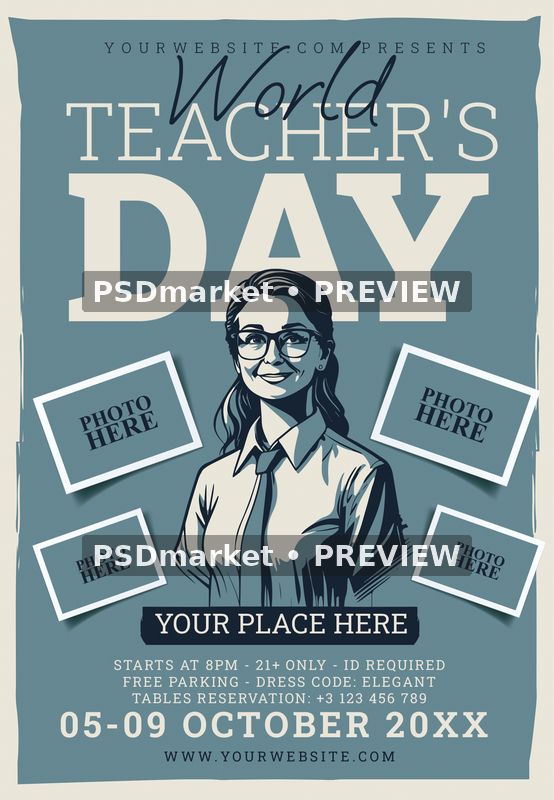
Teachers Day Event Photo Frames Flyer PSD Template combines a muted blue background, oversized cream lettering, a dark script accent, and a central illustrated teacher. Four tilted photo frames surround the figure, creating spaces for your own photographs. The supplied title reads World Teacher’s Day, with DAY occupying a prominent part of the portrait layout.
The design has a paper-like cream border, irregular edges, and dark navy details. White frame outlines and soft shadows give the photograph areas a layered appearance. Each frame currently contains a PHOTO HERE label. These are intentional placeholders that show where your images can sit while keeping the title and central illustration easy to recognize.
Personalize the event information
Use the layout for a teacher appreciation gathering, staff celebration, or other event with suitable replacement wording. Update the organizer line, venue, website, dates, reservation number, and event details. The supplied date field reads 05-09 OCTOBER 20XX, giving you a clearly placed starting point for your own schedule. Check the complete date after editing, including the year and any date range.
The original sample copy describes an evening event starting at 8pm, with a 21+ age requirement, identification, free parking, an elegant dress code, and table reservations. Customize those details to match your actual event and audience. The template’s teacher theme does not determine admission rules; its editable sample text should be reviewed before you export your finished promotion.
Photo areas and editable layers
Add your chosen photographs to the four outlined frames, then adjust their placement and dimensions in Photoshop. The PHOTO HERE labels are live text layers and can be hidden or replaced during customization. The original file contains pixel artwork, grouped design elements, text, photo-filter options, and master adjustments. The central teacher illustration is part of the supplied artwork.
The PSD contains 70 layer records including group-end markers, corresponding to 60 layers and groups in the inspected hierarchy. Twelve records are editable text layers. No smart-object layers were detected in this source, so use its actual layer structure when placing images. The readme includes a general Edit Content workflow; photo placement in this particular template should follow the available layers.
Verified file specifications
- One layered Adobe Photoshop PSD and one readme text file.
- Portrait canvas: 1350 × 1950 pixels.
- Recorded resolution: 300 ppi horizontally and vertically.
- Full canvas size at that resolution: 4.5 × 6.5 inches.
- 8-bit CMYK document with Coated FOGRA27 (ISO 12647-2:2004) embedded.
- Digital ZIP download for editing in Adobe Photoshop.
Fonts and preparation
The readme names Roboto Slab, Oooh Baby, and Times New Roman. The inspected live text uses Roboto Slab Black, Bold, Light, and Regular; Oooh Baby Regular; and Times New Roman Bold. Font files are obtained separately. Install the relevant fonts and review their usage terms before editing, then check headline spacing, script placement, and smaller information lines.
Keep a copy of the original download and save your changes in a separate working file. The readme describes a generic 1275 × 1875-pixel setup, while this PSD’s verified dimensions are 1350 × 1950 pixels. Set final trim, margins, and bleed according to your printer’s requirements. Review a proof at the intended output size before producing copies.
Full-canvas preview
The product preview shows the original stored PSD appearance, converted from its embedded color profile to sRGB. It includes the supplied photo placeholders and two horizontal PSDmarket preview watermarks. The buyer receives the unchanged original ZIP with editable source layers. Review the file requirements and file licenses when preparing your finished design.



Reviews
There are no reviews yet.