Description
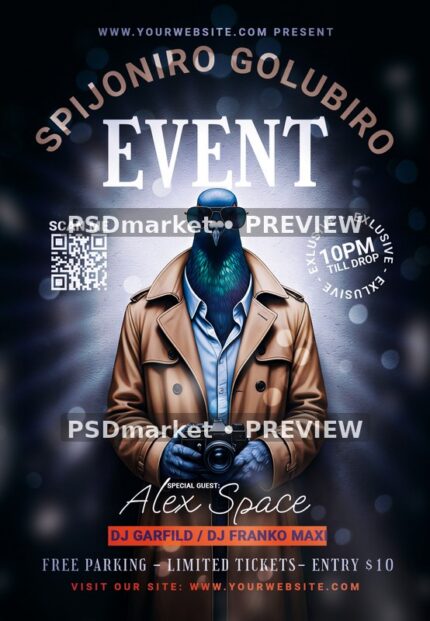
Trench Coat Spijoniro Golubiro Pigeon Flyer
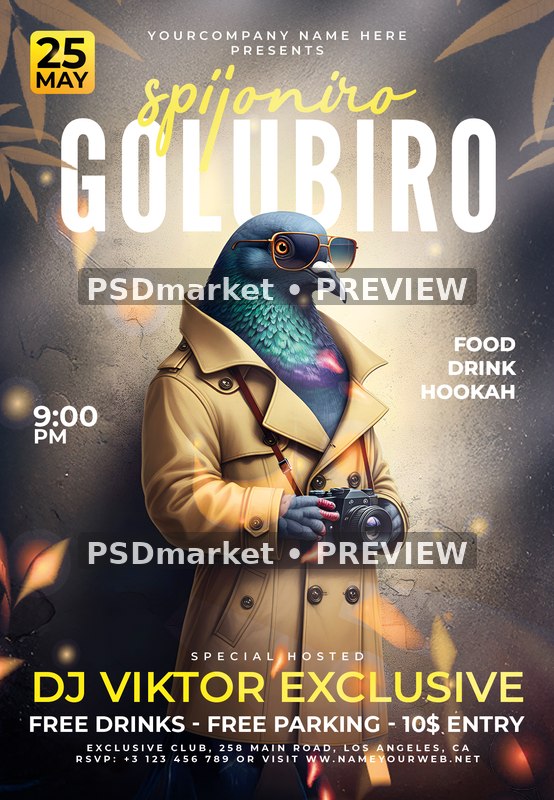
A camera-carrying pigeon in a tan trench coat and orange-rimmed sunglasses stands in front of a textured gray wall with warm lighting and falling leaves. Large white Golubiro type and yellow Spijoniro script sit above the character.
What is included
- One layered Adobe Photoshop PSD document and one readme text file in the original ZIP.
- Canvas: 1350 × 1950 px; stored resolution: 300 ppi horizontally and vertically.
- Native document: CMYK color, 8 bits per channel.
- 9 native editable main-document Type layers and 2 embedded Smart Object layers.
- Font files, separate social-media-size documents, standalone JPEGs and separate vector files are not included.
The pigeon, camera, leaves and textured wall are combined in a single raster layer inside the background Smart Object. A separate date-badge Smart Object contains a shape and an editable Type layer; this does not make the main illustration independently editable.
Replace the May 25 badge, 9 PM, DJ Viktor Exclusive, food/drink/hookah wording, $10 entry and free offers, venue, contact details and presenter. The date is editable inside its own Smart Object, rather than among the main document Type layers.
The measured native canvas above differs from the readme’s generic 1275 × 1875 px, 4 × 6-inch and 0.25-inch bleed claim. A specific trim size and bleed margin have not been verified. The preview preserves the source sample copy; confirm all event details before printing or sharing.
Fonts and editing
Fonts used by the main-document Type layers: Bahagia, LeagueGothic-Regular, Montserrat-Bold, Montserrat-ExtraBold, Montserrat-SemiBold. Font files are not included. Obtain the appropriate font licenses separately or substitute licensed fonts; substitution may change the layout. Spijoniro and Golubiro are native main-document Type layers. To edit the May 25 badge, open the “DOUBLE CLICK TO CHANGE” Smart Object; its embedded “25 MAY.psb” contains a separate Type layer using Montserrat-Bold. Edit the document in Adobe Photoshop, then check spacing and line breaks.
Download and usage
Your purchase provides the original ZIP through the store’s authorized order and account download links. Review File Requirements and License & Usage before ordering.