
Description
Vacation Bible School Red Photo Frames Flyer PSD Template
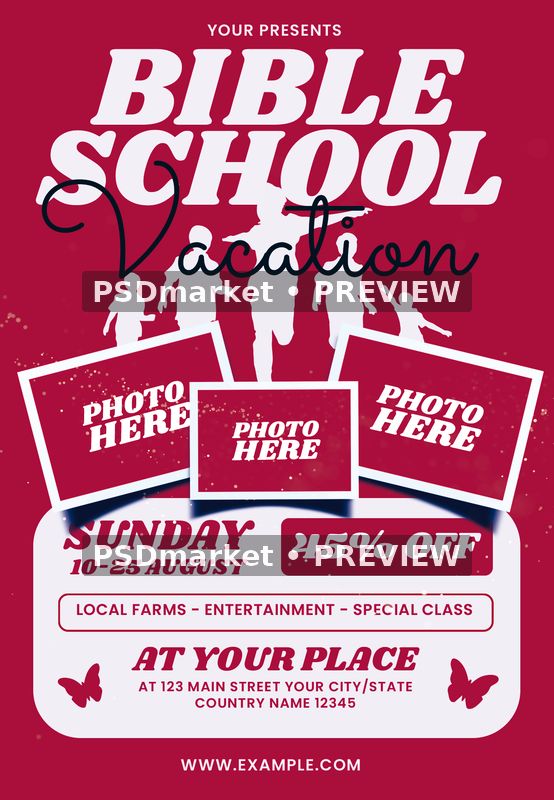
Vacation Bible School Red Photo Frames Flyer PSD Template uses a deep red background, large white headline lettering, and a flowing dark Vacation script. White silhouettes behind the title give the upper section an energetic feel. Three overlapping photograph frames cross the middle, followed by a rounded white information panel containing the event details.
The photo frames are intentionally supplied with PHOTO HERE labels. Their white outlines, angled placement, and shadows establish a ready-made arrangement for your own images. Small scattered accents and butterfly shapes add detail around the lower information area. The design keeps the Bible School title prominent while reserving space for dates, a promotion, location, and website.
Adapt the event copy
Use the editable organizer line to identify your church, group, or event host. Replace the supplied Sunday label, 10-25 August dates, venue, street address, city, country, and website with the information for your program. The headline and script are separate text layers, allowing you to customize the wording while retaining the composition’s large title and handwritten accent.
The sample includes a 45% OFF panel and an activity line reading LOCAL FARMS – ENTERTAINMENT – SPECIAL CLASS. Treat these as editable examples and adapt them to your actual program. A short registration note, activity summary, or other accurate event detail can be placed in the available text areas. Check the finished wording against your schedule before exporting promotional copies.
Three photo areas and grouped artwork
Add your own photographs to the three central frames and adjust each image to suit its space. The PHOTO HERE wording remains live text in the source. Background, design-detail, main-text, text-detail, color-option, and master-adjustment groups separate the main parts of the layout. The supplied artwork includes pixel elements alongside editable type and adjustment layers.
Inspection found 56 layer records including group-end markers, corresponding to 50 layers and groups in the Photoshop hierarchy. Fourteen are editable text layers. No smart-object layers were detected. The readme provides a general Edit Content example, so use the source’s actual layers when adding photographs. Keep the original download and save your customized version as a separate working file.
Verified file specifications
- One layered Adobe Photoshop PSD with one readme text file.
- Portrait canvas measuring 1350 × 1950 pixels.
- Horizontal and vertical resolution recorded as 300 ppi.
- Full canvas measuring 4.5 × 6.5 inches at that resolution.
- 8-bit CMYK document with Coated FOGRA27 (ISO 12647-2:2004) embedded.
- Original editable source supplied as a digital ZIP download.
Fonts used in this source
The readme lists Shrikhand and Poppins. Inspection of the live type identifies Shrikhand Regular for the large display lettering, Poppins SemiBold for information text, and Sacramento Regular for Vacation. Include Sacramento when preparing the fonts for this particular source. Font files are obtained separately; check the respective providers’ usage terms and install the required styles before changing the text.
Look closely at the script’s overlap with the headline and the space inside the promotion panel after editing. Longer dates, addresses, and activity descriptions may need size or line-spacing adjustments. Keep the three photograph areas clearly separated from the information panel, and review small text at the intended printed size so the final location and registration details remain readable.
Preview and print preparation
The preview preserves the full original stored composition and intentional photo placeholders, converted from the source ICC profile to sRGB with two horizontal PSDmarket preview watermarks. The buyer’s ZIP remains unchanged. Use the verified 1350 × 1950-pixel dimensions; the readme describes a generic 1275 × 1875-pixel setup. Confirm trim, bleed, and output settings with your printer, review a proof, and consult the file requirements and file licenses.


Reviews
There are no reviews yet.