
Description
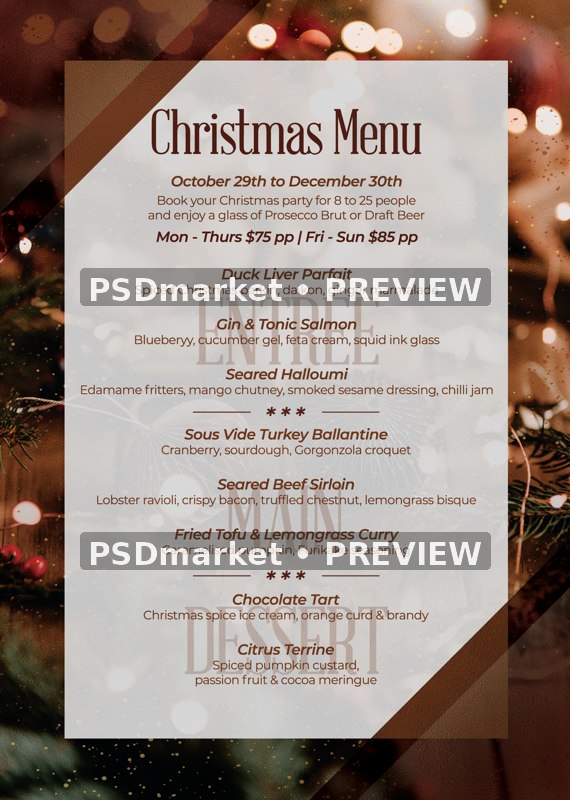
Warm Bokeh Christmas Dinner Menu
A warm photograph of paper ornaments, fir branches and blurred holiday lights surrounds a translucent cream menu panel, with brown diagonal accents and editable Christmas Menu, entrée, main and dessert sections.
What is included
- One layered Photoshop PSD, 1819 × 2551 pixels, 300 ppi, 8-bit CMYK.
- 46 layers and groups, including 10 live editable menu text layers.
- Three embedded smart-object layers: one complete raster photograph and two instances of an editable decorative divider. No standalone vector or 3D assets are supplied.
- Canvas at the saved resolution: 6.063 × 8.503 inches. Confirm final trim, bleed and printer requirements.
- The ZIP includes one PSD, one source reference JPEG and one readme text file. No font files or additional social-size PSD is included.
- Actual text fonts: AbrahamLincoln, Montserrat-Regular, Montserrat-SemiBoldItalic.
The reduced, watermarked preview follows the validated actual PSD rendering with only the obstructing top logo layer hidden. The original ZIP and PSD remain unchanged.
The source is a Christmas menu. Its October 29–December 30 dates, $75/$85 per-person prices, group-drinks offer and dish descriptions are editable examples. Replace them with your actual menu and correct sample spelling before use.
Displayed meal prices are source examples and are separate from the template purchase price.
The included reference JPEG has matching layout and text but differs in color rendering; this listing preview represents the actual PSD appearance.
Use the verified canvas and layer facts above. Generic readme specifications may describe a different template. Font files and font licenses are not included; obtain the fonts and permissions needed for your intended use.
Fonts and editing
Open the PSD files in Adobe Photoshop and customize the available text layers. Font files are not included; the readme provides font-reference links. Review missing-font prompts and verify each font’s license for your intended use. Proof all content before printing or publishing.
Download and usage
Your purchase provides the original ZIP through the store’s authorized order and account download links. Review File Requirements and License & Usage before ordering.



Reviews
There are no reviews yet.