
Description
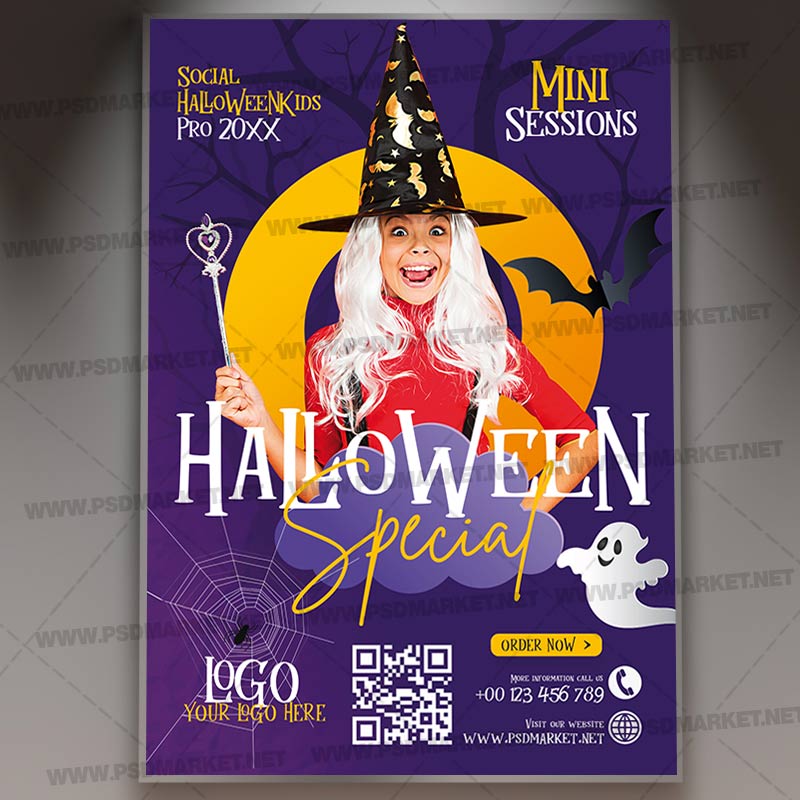
Witch Costume Halloween Mini Sessions Flyer
A smiling witch-costumed child with long white hair, a pointed black hat and red cape stands before a yellow moon on a purple background. Friendly ghosts, bats, a spiderweb and white-and-gold Halloween Special lettering frame the mini-session promotion. Customize the available text layers for your event or promotion.
What is included
- 1 layered Adobe Photoshop PSD file and a readme text file in the ZIP archive
- Verified main PSD canvas: 1350 × 1950 pixels, 300 ppi, CMYK color, 8-bit
- Canvas size at the saved resolution: 4.5 × 6.5 inches. Confirm final trim and bleed settings with your printer
- 12 editable type layers in the main PSD for the event information
- Organized layer groups
- Color-adjustment layers in the Photoshop document
The preview is a reduced, watermarked image of the supplied artwork. The ZIP contains the original PSD. Dates, times, age notices, names, addresses, prices and promotional offers shown are sample content to customize. No Illustrator or font file is included in this archive.
The product image is a watermarked presentation mockup of the verified matching design. The ZIP includes the flat flyer PSD and readme; the gray display background and mockup scene are not separate supplied templates.
The original PSD retains a visible source preview-branding layer. Hide that layer in Photoshop before editing or exporting.
The photo is supplied as a raster layer, not a smart object. The readme’s generic smart-object replacement instructions do not apply to this PSD.
Update the mini-session branding, contact details and logo placeholder for the actual promotion.
The main headline and supporting promotional wording are supplied as editable Photoshop type layers. Photographic and illustrated artwork remains in raster layers.
Fonts and editing
Open the PSD in Adobe Photoshop and update the available text layers and event details. The readme provides font-reference links. Font files are not bundled; review Photoshop’s missing-font prompts and check each font’s license before use. Some illustration or decorative lettering may be embedded artwork rather than editable type.
The dimensions above were checked directly in the PSD. The readme contains a generic older size statement, so use the actual document settings when preparing the artwork.
Download and usage
Your purchase provides the ZIP through the store’s authorized order and account download links. Review File Requirements and License & Usage before ordering. Customize and proof the artwork before printing or publishing your promotion.
Reviews
There are no reviews yet.