

Description
Yoga Class Botanical Flyer PSD Template
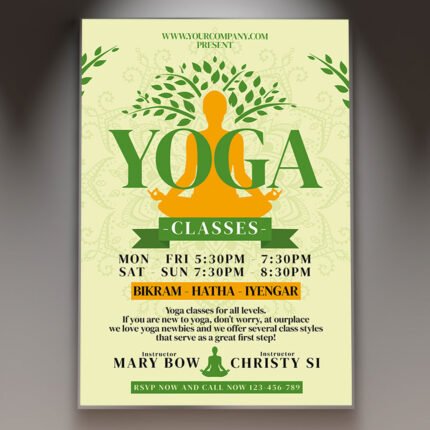
Yoga Class Botanical Flyer PSD Template presents a calm portrait layout in warm cream, dark green, brown, and orange. A seated yoga silhouette forms the center of a leafy tree graphic, while large serif lettering introduces the class at the top. Orange leaf accents in opposite corners connect the headline color with the surrounding botanical design.
The supplied composition includes separate areas for an organizer, class title, private sessions, price, dates, instructor, timetable, website, and contact number. A small circular checkerboard photo placeholder sits beside the instructor credit. This intentional image area gives you a defined place for a portrait or another suitable photograph when personalizing the template.
Build your class announcement
Replace the company name, instructor credit, booking information, website, and class description with your own details. The original sample promotes private yoga classes, groups of two to eight people, and classes for all levels. It names Bikram, Hatha, and Iyengar in the lower section. Keep only the descriptions that accurately represent the sessions you offer.
The artwork includes several editable schedule fields: a 25-29 July date, a 7-10pm line, an every-Saturday time, and separate weekday and weekend hours. A brown price panel displays $10/$12 per hour. These are template examples, so update the complete schedule and pricing together. The small paragraph is placeholder copy ready for a short introduction to your own classes.
Work with the supplied design
The headline pairs brown Yoga lettering with orange Class lettering. Dark green secondary text echoes the tree illustration, and narrow color panels distinguish key details from the cream background. Keep the main class title, instructor area, booking number, and price visually separate as you replace the text. Review longer names and web addresses for comfortable spacing.
The PSD has 53 layer records including group-end markers, representing 47 layers and groups in the inspected hierarchy. Twenty are editable text layers. Background, design-detail, main-text, text-detail, color-option, and master-adjustment groups help separate the artwork. The source includes pixel elements and adjustment layers. No smart-object layers were detected; place your photograph using the actual layer structure and circular area.
Verified Photoshop specifications
- One original layered PSD and one readme text file.
- 1350 × 1950-pixel portrait canvas.
- 300 ppi recorded on both axes.
- 4.5 × 6.5-inch full canvas at the recorded resolution.
- 8-bit CMYK color with an embedded Coated FOGRA27 (ISO 12647-2:2004) profile.
- Digital ZIP delivery for customization in Adobe Photoshop.
Fonts and editing guidance
The readme links to Libre Caslon Text. Inspection confirms Libre Caslon Text Regular and Bold in the live text layers, matching the design’s serif typography. Font files are obtained separately from the font provider. Review the applicable usage terms, install the needed styles, and check the full layout after editing to catch changes in wrapping, alignment, and character spacing.
The supplied readme includes general Photoshop instructions, including a smart-object replacement example. Follow the structure of this particular source when editing its photograph area. Work on a duplicate so that the original download remains available. The circular placeholder is part of the supplied presentation and can be filled with your chosen image as you customize the flyer.
Preview and output
The full-canvas preview comes from the original PSD’s stored composite, with its embedded profile converted to sRGB and two horizontal PSDmarket preview watermarks added. The downloadable original retains its editable layers. Its verified dimensions are 1350 × 1950 pixels; the readme’s generic 1275 × 1875-pixel specification differs. Confirm trim, bleed, color settings, and export format with your printer, then review a final proof. Consult the file requirements and file licenses before production.


Reviews
There are no reviews yet.