
Description
Your Sushi Discount Restaurant Flyer PSD Template
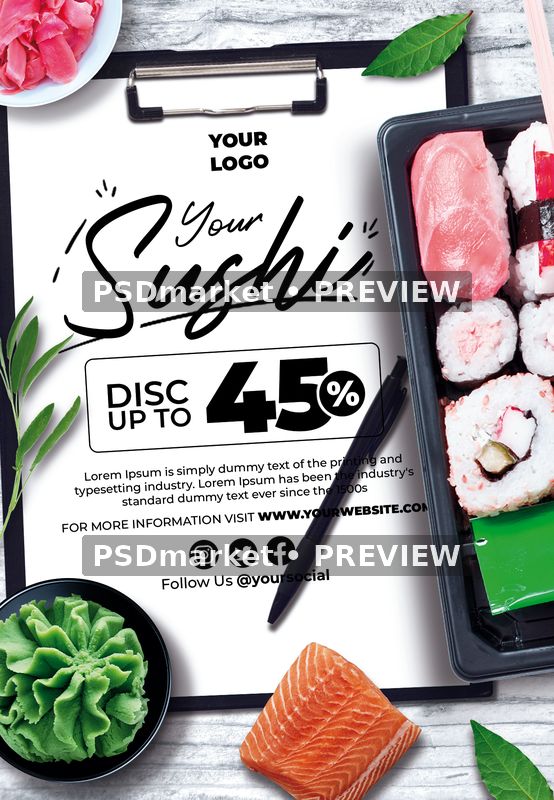
Your Sushi Discount Restaurant Flyer PSD Template presents a food promotion with YOUR SUSHI title lettering, a logo placeholder, and an offer area reading DISC UP TO 45%. A supporting paragraph, social handle, and website line give the layout room for restaurant information beneath the main promotional message. This portrait source can be adapted for a sushi restaurant, takeaway offer, or food-themed promotional event.
The design resembles a restaurant offer displayed on a clipboard. Black script and offer lettering sit on white paper, framed by a sushi tray, salmon, wasabi, ginger, and green leaves against a pale wooden background.
Customize the supplied information
Replace the logo placeholder, sushi heading, discount figure, supporting paragraph, social handle, and website with your own restaurant information. The 45% figure is sample artwork, not an offer attached to this template. Confirm the real discount, qualifying products, dates, and conditions before publishing a finished advertisement. Replace all Lorem Ipsum copy rather than leaving filler text in customer-facing material.
Keep the main message short enough to fit the existing text area. After changing names, dates, or contact details, check line breaks, alignment, spacing, and contrast at both full size and a smaller preview size. Longer copy may need a different arrangement. Review the complete canvas so that secondary text and old placeholders are not overlooked.
Included source and verified specifications
The original ZIP contains one layered Adobe Photoshop PSD and one readme text file. The verified document measures 1350 × 1950 pixels and stores 300 ppi horizontally and vertically. Its complete canvas is therefore 4.5 × 6.5 inches at the recorded resolution. The source is 8-bit CMYK with an embedded Coated FOGRA27 (ISO 12647-2:2004) color profile.
- One portrait Photoshop source with editable text.
- 60 layer records, including group-end markers.
- 55 layers and groups excluding end markers.
- 10 text layers and 0 detected smart-object layers.
- No bundled font files or separate print PDF.
- Digital ZIP delivery; no physical product is supplied.
Fonts and editing workflow
Open the PSD, hide its top promotional cover, and review the artwork before editing. Save your customized project separately so that the original ZIP remains available for comparison.
The readme links to Montserrat and Roustel. Original text layers use Roustel-Regular and several Montserrat weights, including Black, Bold, Medium, Regular, and SemiBold. Obtain any missing fonts from their providers and review their applicable usage terms. A replacement typeface can change letter widths, line breaks, and alignment, so inspect the layout again after resolving fonts.
There are no detected smart-object layers in this source. The illustration and food-related elements are arranged as pixel layers, shapes, and groups. Use the actual layer structure when replacing imagery. The generic image-replacement steps in the readme should not be treated as evidence of a one-click photo placeholder in this particular PSD.
Preview and production
The product preview is exported in Adobe Photoshop from a temporary copy that preserves the original cached text appearance. Only the promotional cover is hidden. A duplicate is flattened and converted to sRGB for the preview, retaining the full canvas and adding two horizontal PSDmarket preview watermarks. The downloadable original keeps its editable text and unchanged source artwork.
The readme describes a 1275 × 1875-pixel setup that differs from the verified document dimensions. A final trim size and bleed allowance have not been independently established. Confirm margins, color handling, and export requirements with your printer before production. For digital promotion, prepare an appropriately sized RGB export and check the actual crop and text visibility in its intended placement. Review the file requirements and file licenses before using the template.
Reviews
There are no reviews yet.