
Description
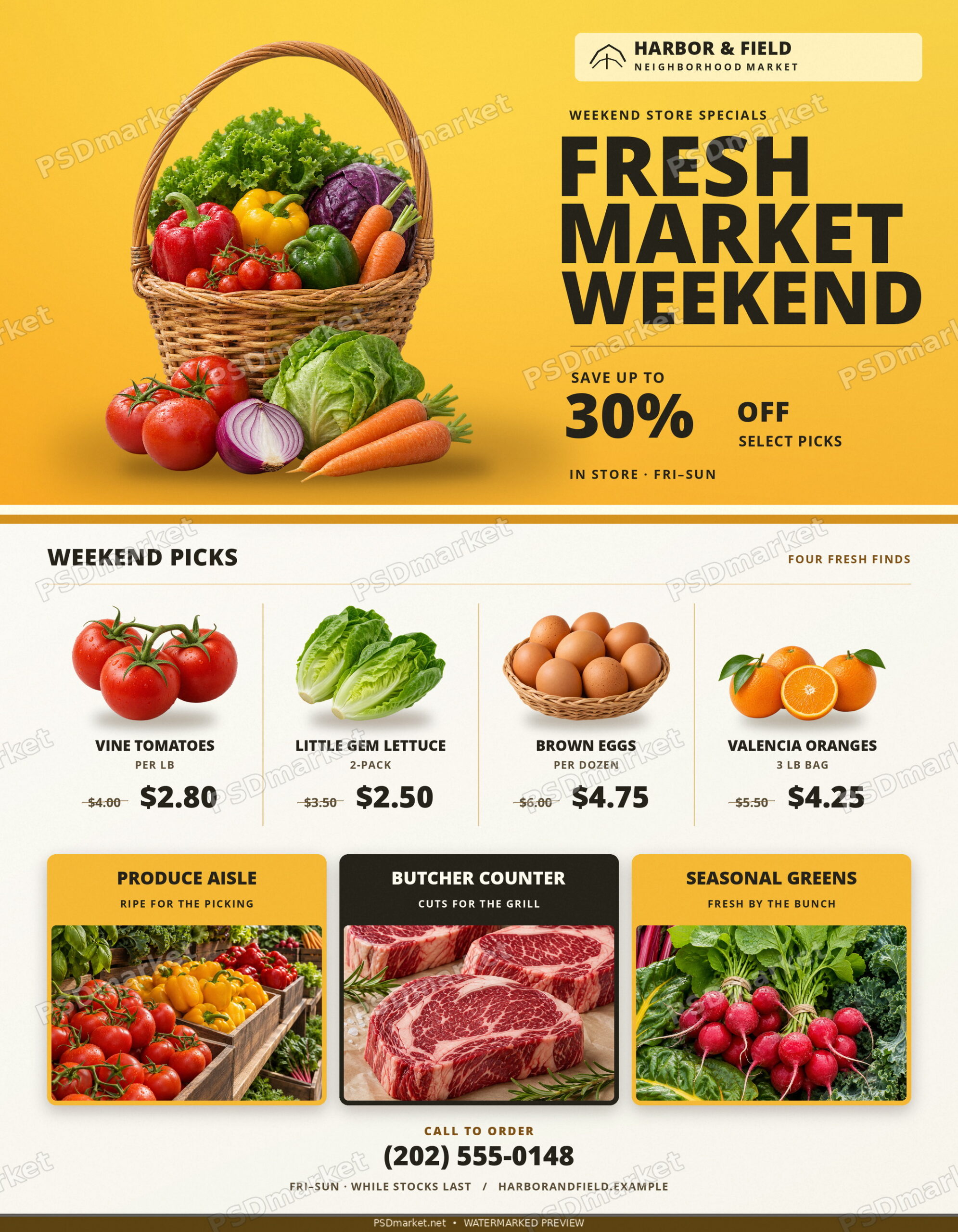
Fresh Market Weekend is a grocery sale flyer PSD built like a weekend circular: a full wicker basket of vegetables first, then the prices shoppers need to make a list. The marigold header gives weekend specials a recognizable look. An ivory offer row keeps four items divided, and three food photo tiles at the bottom point to other departments or seasonal products. The clear split between the basket, deals and photo tiles lets someone see the main offer without reading every detail.
Use it for a neighborhood grocer, a produce market, a supermarket department or a farm shop that changes its specials every week. Lead with a few items your customers are likely to use together. Tomatoes and lettuce can anchor a salad promotion, while eggs or oranges make sense for a weekend breakfast theme. There is still room to tell readers about the rest of the store without taking attention away from the four main offers.
Make the prices clear with this grocery sale flyer PSD
Use each offer slot for the product name, current price and the unit it applies to, whether that is a pound, a dozen, a bag or a multipack. Keep the unit next to the amount so shoppers do not have to guess. If you show a previous price, check that it matches the product and pack size. Use an up to line only when it describes what is actually on offer, and give any item or date limits alongside the promotion. For a short sale, state its start and end dates together instead of relying on the word weekend alone. The pictured store, prices and discount illustrate the layout; they are not a live sale.
Give the lower food tiles a purpose
The sample tiles highlight the produce aisle, butcher counter and seasonal greens. Use those blocks to direct shoppers to departments, introduce a new shelf or point to ingredients for a weekend meal. If you do not have a meat counter, give the center tile another role, such as pantry finds, in-season fruit or a prepared-food display. A short label is enough when the photo shows what shoppers can expect.
Put the flyer on a counter, in a shop window, in a weekly email or on a market’s social page. Share the full vertical composition first so the four offers stay readable. For a smaller crop, repeat the item names, units and any important terms in the post text. Take one last look at the prices, spelling and ordering details before printing, and ask your printer about trim and bleed if you plan to produce copies.
What comes in the download
The ZIP includes a layered Photoshop PSD at 2625 × 3375 pixels, 300 ppi, in sRGB, a clean full-resolution JPEG, three fonts with their licenses and a short setup guide. The headline, store name, product labels, prices and other text are editable, so you can keep the layout and update the offers for the next week. The wicker basket introduces the promotion, four item panels organize the deals, and three framed food photographs give the bottom of the flyer a clear visual rhythm.
Install the included fonts before opening the PSD. Use the JPEG as a reference for the supplied design, and export your own copy once you’ve replaced the sample store and offer details. Check the type in the four price panels again if you use longer product names.

Reviews
There are no reviews yet.