Description
International Harvest Basket Festival Flyer
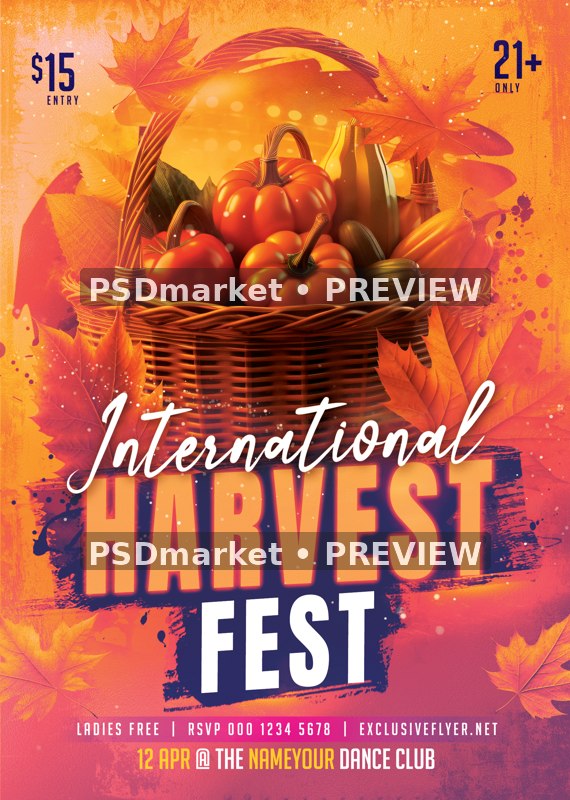
A wicker basket of pumpkins, tomatoes, gourds and corn sits at the top of an energetic orange, pink and purple design. White script International text crosses the basket above stacked Harvest Fest lettering and colored brush textures.
What is included
- One layered Photoshop PSD, 1819 × 2551 px
- 300 ppi, 8-bit CMYK
- 74 layers/groups including 11 live editable type layers and 7 embedded smart-object layers
- Canvas is 6.063 × 8.503 inches at the saved resolution; final trim and bleed are not independently verified.
- Seven embedded raster smart-object layers contain one basket image and six leaf placements. Eleven live type layers remain editable. The basket is a single combined image, not individually editable vegetables.
- ZIP includes one PSD, 1 JPEG/PNG source previews and 1 readme text file(s); no font files are bundled.
The preview is a reduced, watermarked image of the actual stored PSD composite. The original downloadable ZIP is unchanged.
Adobe Photoshop editing workflow; obtain the actual active fonts or choose licensed substitutes before editing.
Big Noodle Titling is labeled for personal use by its distributor. Christmas is an active font, but the readme supplies only a general font-category link, not an exact font identity or license. Verify all active fonts before commercial editing.
Replace 12 APR, the sample dance-club name, $15 entry, 21+ rule, ladies-free offer, RSVP number and website. The archive supplies a harvest design suitable for retiming, not an April event to promote as current.
Sample admission prices, promotions and artist names are design placeholders, not verified event details or the template purchase price.
The readme may contain generic dimensions and instructions. Use the actual PSD facts listed here.
Fonts and editing
Open the PSD files in Adobe Photoshop and customize the available text layers. Font files are not included; the readme provides font-reference links. Review missing-font prompts and verify each font’s license for your intended use. Proof all content before printing or publishing.
Download and usage
Your purchase provides the original ZIP through the store’s authorized order and account download links. Review File Requirements and License & Usage before ordering.